
1-Visitor
May 18, 2017
Question

How to publish experience for public

  • May 18, 2017
  • 4 replies
  • 5862 views

Hi all,


I am using trial version of ThingWorx Studio for 90 days.


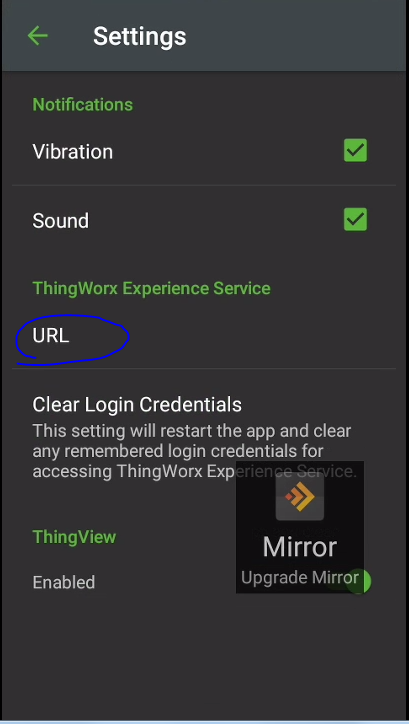
When i publish experience i am able to see it with ThingWorx View just in the case i add thingworx experience service URL to thingworx view settings.


Is it possible to publish it to public, so i can see it even i do not add this URL?


Thank you,


Michal

4 replies

5-Regular Member
May 18, 2017

Michal,

Yes it is possible for public view i.e., an user with ThingWorx View app can scan the ThingMark and view the associated Experience.

Also, we don't even need to add URL in the app settings. Please follow the Help center article on configuring Public Access to Experience projects and especially the Grant user permissions section. 

mhucik1-VisitorAuthor
1-Visitor
May 23, 2017

Hi Giri,

Thank you for your quick reply.

I will check it.

Bye

mhucik1-VisitorAuthor
1-Visitor
May 24, 2017

I am publishing just uploaded pvz files

5-Regular Member
May 26, 2017

Hej Michal,

public means that you dont need user/password to access the experience.

You can set it up from directly your experience in Studio: "Info / public".

However you will not need to enter an URL into thingworx view app, if you use the thingmarks that were provided with your Trial/ bought edition.

Those Thingmarks are automatically linked to your experience server.

However the behavior could be different if your mobile device is hooked to a proxy forbidding to access our indexing service.

Did you try it when being on a mobile network (without any proxy / company vpn).

Thanks

martin

mhucik1-VisitorAuthor
1-Visitor
June 7, 2017

Hi Martin

Yes i have tried diferent networks and my mobile network too.

Michal

mhucik1-VisitorAuthor
1-Visitor
September 21, 2017

Hi all,

I have created video to show how i followed instructions to set public experience up. 

Video Link : 2053

If somebody know where i have done a mistake replay

21-Topaz I
September 26, 2017

Hi Michal,

Everything looks correct from what you have shown. Do you have the ThingMark bound within the experience? Please make sure you have ThingMark 1262:2 listed in the ThingMark property within your experience. Below is an example from my experience using a different ThingMark.

mhucik1-VisitorAuthor
1-Visitor
September 27, 2017

Hi Tara,

First of all thank you for your interest and replay.

Yes i have it bounded. Look at the picture below

Thingmark_bound.PNG

Michal