
10-Marble
February 16, 2026
Question

Facing issues while working with onClickHandler function in Split Pane functionality

  • February 16, 2026
  • 1 reply
  • 99 views

Version: Windchill 13.0


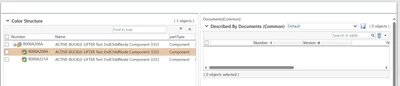
Use Case: When we click a Part on Left Pane then we will be seeing the documents on the right pane.


Description:

Requirement : When we click a Part on Left Pane then we will be seeing the documents on the right pane.

There is a same functionality on Part Structure Tab for WTPart object. I am not able to find the OOTB files. 
 

KanchanaDutta_0-1771227779398.png

I am referring to carambola, TwoPaneExample.js. Could anyone please help me with this ?


1 reply

HelesicPetr
22-Sapphire II
22-Sapphire II
February 16, 2026

Hi @KanchanaDutta 

I would use js function to reload the right table. You should be able to call the js function when you click on the wtpart in the left tree.

In the table definition you should be able to get the selected row information from a commandBean 


I use this technique in own wizard to load data to a table based on a previous step definition.

PetrH

10-Marble
February 16, 2026

Hi @HelesicPetr 


Thanks for your response!

Could you please help me with a sample code or a OOTB reference?


10-Marble
February 17, 2026

Hi @HelesicPetr 

Agreed. Part Structure is based on GWT technology. Here is my observation : Under Product -> Folder also uses Split Pane functionality. I tried using Inspect on the Page but I was not able to find the js and jsp it is using. On clicking on Parts folder in the Left, it is displaying the Parts on the Right.

KanchanaDutta_0-1771325809122.png

Also, I am working with Split Pane OOTB example:

\codebase\netmarkets\jsp\carambola\customization\examples\twoPanePanels

Please find the document to understand the functionalities I have tried to implement. Could you please look into the document and guide me on the next steps if possible?


Thank you !

Kanchana