
15-Moonstone
August 21, 2025
Solved

How to add new category valve to Windchill Design Review workflow category dropdown menu?

  • August 21, 2025
  • 1 reply
  • 392 views

Version: Windchill 13.0


Use Case: Would like to add another design review category option called New Design to the default Design Review workflow in windchill that would be used for all new drawing releases.


Description:

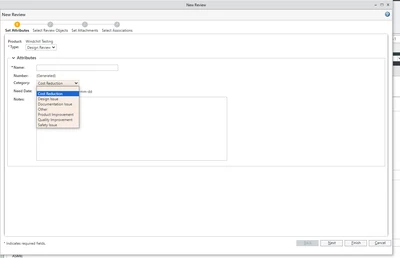
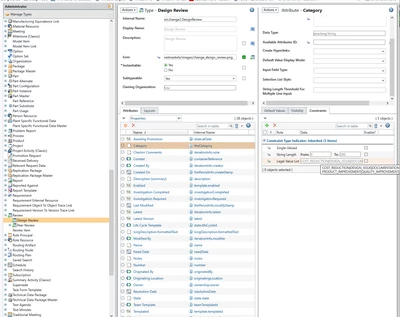
How do I add a new category valve to Windchill Design Review workflow category dropdown menu shown in the images below?
danders238_0-1755800948022.png

danders238_1-1755801463352.png


Best answer by avillanueva

The Category drop down is the same as other change objects like problem reports and change requests. It is controlled by a Resource Bundle, specifically, the wt.change2.CategoryRB.rbInfo. You can remove or add your own entries to this but note that this will also change those object categories as well. Steps are documented here:

https://www.ptc.com/en/support/article/CS63102?source=search

Your modifications should be managed here: Windchill/wtCustom/wt/change2/CategoryRB.rbinfo


1 reply

avillanueva
23-Emerald I
23-Emerald I
August 22, 2025

The Category drop down is the same as other change objects like problem reports and change requests. It is controlled by a Resource Bundle, specifically, the wt.change2.CategoryRB.rbInfo. You can remove or add your own entries to this but note that this will also change those object categories as well. Steps are documented here:

https://www.ptc.com/en/support/article/CS63102?source=search

Your modifications should be managed here: Windchill/wtCustom/wt/change2/CategoryRB.rbinfo