

How to create a baseline in a promotion request workflow?
Version: Windchill 12.0.2.18
Hi,
We are looking to create a Managed Baseline in our promotion request workflow for all mechanical assembly with the name *-01-g.asm
I have found the Article - CS371627 - How to create a baseline in a (promotion request) workflow? and the Article - CS25967 - How to programmatically create a managed baseline in Windchill PDMLink which give some ideas, but I am having some difficulty going deeper into the development.
The small step I have already succeed is the following :
Add an "Execute Expression" robot after the "Set State Approved" method Robot and the Notify By E-mail robot :
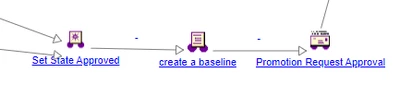
The code to execute to the expression call a custom class :
ext.sce.workflow.CreateBaseline.createBaseline(baselineName);
The content of the class is the following :
package ext.sce.workflow;

import wt.vc.baseline.ManagedBaseline;
import wt.util.WTException;
import wt.util.WTPropertyVetoException;
import wt.fc.PersistenceHelper;


public class CreateBaseline {

 public static void createBaseline(String name) throws WTException {
 try {
 System.out.println("Start....");
 ManagedBaseline myManagedBaseline = ManagedBaseline.newManagedBaseline();
 myManagedBaseline.setName("test");
 myManagedBaseline.setDescription("this is a test baseline");
 myManagedBaseline = (ManagedBaseline) PersistenceHelper.manager.save(myManagedBaseline);
 System.out.println("===> myManagedBaseline " + myManagedBaseline);
 } catch (WTPropertyVetoException e) {
 e.printStackTrace();
 } catch (WTException e) {
 e.printStackTrace();
 }
 }
}
When a CAD assembly is approved, a Managed Baseline is created in the Default folder of the Site.
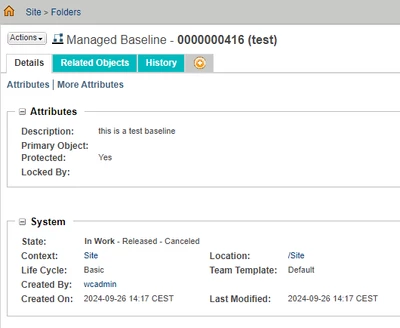
Now the expectation is to create the ManagedBaseline in the folder of the primary object and add the collection of Baselineable CAD model to the baseline.
If I follow the example in the CS25967 in order to create the ManagedBaseline in the correct folder :
package ext.sce.workflow;

import wt.vc.baseline.ManagedBaseline;
import wt.part.WTPart;
import wt.fc.WTObject;
import wt.folder.Folder;
import wt.folder.FolderEntry;
import wt.folder.FolderHelper;
import wt.inf.container.WTContainer;
import wt.inf.container.WTContainerRef;

public class CreateBaseline_1 {

public static void createBaseline(WTPart part,String ContainerName) throws Exception {
System.out.println("Start....");
ManagedBaseline baselineObj = ManagedBaseline.newManagedBaseline();
baselineObj.setName("test");
baselineObj.setDescription("this is a test baseline");
baselineObj.setContainerReference((WTPart)primaryBusinessObject.getContainerReference());

WTContainerRef containerRef = WTContainerRef.newWTContainerRef(containerRef);
Folder folder = FolderHelper.service.getFolder("/Default/Baseline", containerRef);
FolderHelper.assignLocation((FolderEntry)baselineObj, folder);

baselineObj=(ManagedBaseline)wt.fc.PersistenceHelper.manager.save(baselineObj);
System.out.println("===> myManagedBaseline " +baselineObj);
}
}
There is an issue with the setContainerReference
Any idea how to solve this ?
Best regards,
Loïc