
18-Opal
April 14, 2020
Question

How to display navigation menu according to role?
  • April 14, 2020
  • 1 reply
  • 990 views

Hi,

How to display navigation menu according to role?


ccc.png

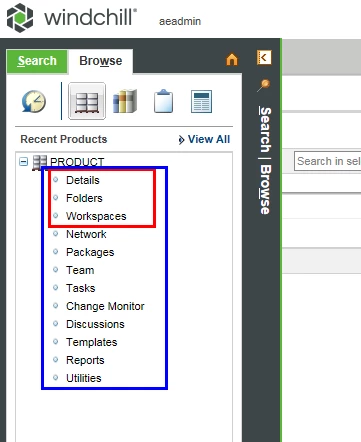
We need depending on the role of the member, it is to limit the displayed navigator.
As an example, the product manager can see all (blue squares) navigators.
Roles except the product manager can see only to the navigator in the red square.


Please help us what chapters to look at when developing, and what files to edit in the codebase.


Thanks, Warm Regards,

SeonHo Cha,

1 reply

5-Regular Member
April 23, 2020

Hi SeonHo,


Maybe someone else can chime in here, but, those navigator menu options are shown (or not shown) depending role/profile checks.


ex.

https://www.ptc.com/en/support/article/CS65267


If you check this article, for your version of Windchill,

https://www.ptc.com/en/support/article/CS297225


We have license profile matrix/spreadsheet, which shows which profiles enable which actions.

A lot of the general license profiles, do have a minimum base of actions available, ex.  (showing Team page, for example).


Mike