6-Contributor
May 8, 2023
Solved

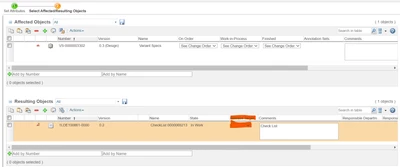
How to remove blank space in Target State for resulting object in WC12

  • May 8, 2023
  • 3 replies
  • 3042 views

Hi ,

In WC12 for every resulting object the default target state is blank How we can able to remove that or Is there any way to disable it?

 

BA_10670508_0-1683544473147.png

@HelesicPetr 

Best answer by avillanueva

You want it to say "Change" as the default?

3 replies

avillanueva
23-Emerald I
23-Emerald I
May 8, 2023

You want it to say "Change" as the default?

6-Contributor
May 8, 2023

Hi @avillanueva ,

Yes I want change as default target state.

avillanueva
23-Emerald I
23-Emerald I
May 8, 2023

avillanueva_0-1683547365323.png

Check your lifecycle state for those resulting items. Make sure that "Change" has a state checked for it. You will have to update lifecycles for existing items to pick this up.

6-Contributor
May 8, 2023

@avillanueva  But In WC12 the default target state is blank so How can we remove that

6-Contributor
May 8, 2023

Hi @avillanueva ,

Yes it is mapped properly I have enabled Released state from Change but still the default is blank only.

Please check - https://www.ptc.com/en/support/article/CS370326.

Any other option I can do?

HelesicPetr
22-Sapphire II
22-Sapphire II
August 21, 2024

Hi @BA_10670508 

Have you tried to set a type and attribute default value?

HelesicPetr_1-1724231657311.png

PetrH

3-Newcomer
August 21, 2024

Hi @HelesicPetr , 


After configuring the default value in change record, still the blank value is auto selected in release target state. 


@BA_10670508 @avillanueva - Can you please suggest if you got any solution on the same. 


Thanks and Best Regards

Nagaraj Nadagouda

12-Amethyst
June 12, 2025

We need to set default in two places to work:


one in Transitions and other is Change Transition RB


Srinivas_256_1-1749730930677.png


Srinivas_256_2-1749730946031.png