
12-Amethyst
August 18, 2024
Question

Please help me create WTPart with WRS

  • August 18, 2024
  • 2 replies
  • 1952 views
I am creating and testing simple functions using EXCEL VBA.
I am testing the function with WRS before coding EXCEL VBA.
 
WRS > PTC Product Management Domain V6 > Testing POST /CreateParts results in an error
 
Where the error occurs
 "Context@odata.bind": "Containers('OR:wt.pdmlink.PDMLinkProduct:131308')",
 
 
erro code : 400
 - MALFORMED_BINDING_LINK
 - "The format of 'binding link' is incorrect."
 
Many users have asked about the above issue in Google search results, and I have tested it several times by referring to the answers.
 
1. I tested it by referring to the PTC manual, but an error occurred.,  - MALFORMED_BINDING_LINK
 
    **** Request Body
 
      {
"Name":"TestWTPart_001",
"AssemblyMode": {
"Value": "separable",
"Display": "Separable"
    },
 
"PhantomManufacturingPart" : false,
"Context@odata.bind": "Containers('OR:wt.pdmlink.PDMLinkProduct:48507000')"
      }
 
2. I also defined "Folder@odata.bind", but I get an error
3. I also defined "PTC.DataAdmin.Containers ('OR:wt.pdmlink.PDMLinkProduct:131308') ", but an error occurs
 
Anyone who has successfully created WTPart with WRS, please help me.
 
thank you
koko
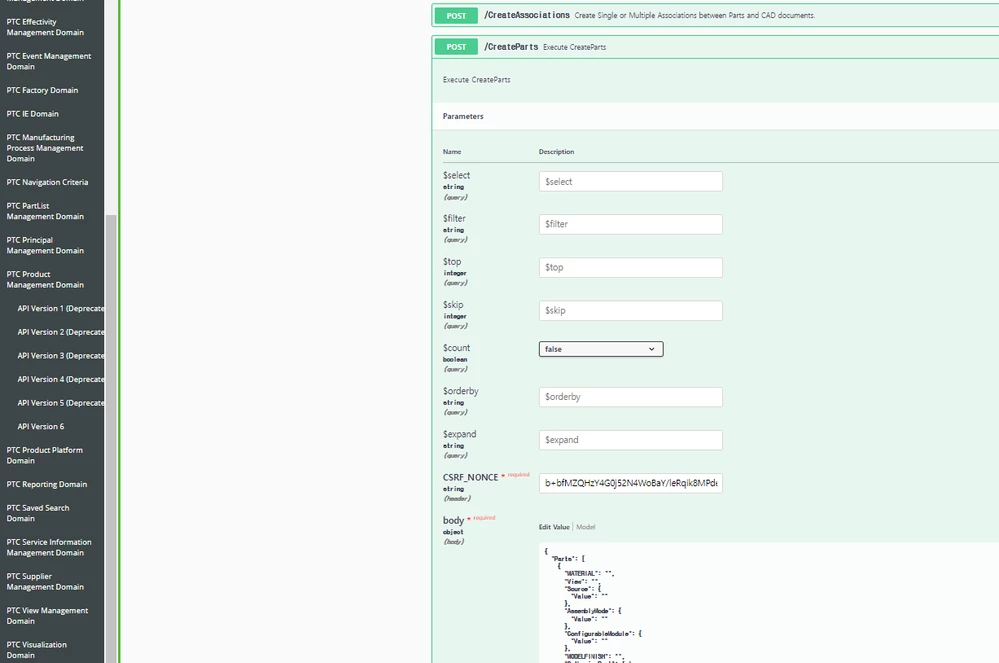
k1.png

2 replies

Community Moderator
August 22, 2024

Hi cko,

Thank you for your question. 

Your post appears well documented but has not yet received any response. I am replying to raise awareness. Hopefully, another community member will be able to help.

Thanks & Regards,

Vivek N
Community Moderation Team.

17-Peridot
August 22, 2024

Since you haven't pasted an error it's difficult to find the exact problem. It could be that you forgot to set the binding of the odata type?
This should work:

{
 "@odata.type": "#PTC.ProdMgmt.Part",
 "AssemblyMode": {
 "Value": "component"
 },
 "EndItem": false,
 "Context@odata.bind": "Containers('OR:wt.pdmlink.PDMLinkProduct:131439')",
 "DefaultUnit": {
 "Value": "ea"
 },
 "DefaultTraceCode": {
 "Value": "0"
 },
 "View": "Design",
 "GatheringPart": false,
 "Source": {
 "Value": "make"
 },
 "PhantomManufacturingPart": false,
 "Name": "Test Rest"
}


cko12-AmethystAuthor
12-Amethyst
August 22, 2024

Thank you

I tested WRS but I get the same error. The error is below (T.T)
If WRS passes the test, I want to develop it with excel VBA 

Error: 400

Response body
*******************************************************************
{
"error": {
"code": "MALFORMED_BINDING_LINK",
"message": "The format of 'binding link' is incorrect."
}
}
*******************************************************************

Response headers

*******************************************************************
connection: close
content-type: application/json;odata.metadata=minimal
date: Thu,22 Aug 2024 21:49:27 GMT
odata-version: 4.0
server: Apache
transfer-encoding: chunked
vary: Accept-Encoding,User-Agent
x-content-type-options: nosniff
x-do-not-compress-this: 1
x-frame-options: SAMEORIGIN
x-ptc-connected:
*******************************************************************

17-Peridot
August 23, 2024

does it work inside the Windchill WRS page? Or with which program are you running the code? The easiest way is to run it inside Windchill. If the call is failing there, you probably have a problem with an OIR?