7-Bedrock
May 3, 2024
Solved

Subscription Emails: How to Customize Subject Line Sent Out Via Email?

  • May 3, 2024
  • 1 reply
  • 4629 views

Version: Windchill 12.0


Use Case: I have a case where I need to be able to control the Subject Line that is displayed in the email notifications triggered by a Subscription. Running a WC 12.0.2.X system.


Description:

When creating a Subscription, on page 3 (Define Subject and Expiration), the user can input any text they want as the Subject of the Subscription.

Therefore, when an email is sent, the Subject Line of the email is the characters inputted in the Subject.

I need to be able to still allow users to input whatever subject line they want in the Subject field so that it is still visible in Windchill.

But, I want to change the Subject Line that is displayed in the Emails.


For workflows, this was fairly simple.

I added the following script to the General.html file between the <html> and <head> tags:

<SCRIPT language=Windchill> <!-- beginSubject --> </SCRIPT>
<SCRIPT language=Windchill> <!-- getInitSubject --> </SCRIPT>
<SCRIPT language=Windchill> <!-- getProcessName --> </SCRIPT>
<SCRIPT language=Windchill> <!-- addText text=" - " --> </SCRIPT>
<SCRIPT language=Windchill> <!-- getActivityName --> </SCRIPT>
<SCRIPT language=Windchill> <!-- endSubject --> </SCRIPT>


For Subscriptions, the Subject Line in Emails seems to be coming from a Java class, and therefore adding that script to the subscriptionNotification.html file does not work. (It causes a blank email to be sent with no change to the Subject Line)


Does anyone have any advice or experience with customizing the Subject Line displayed in Subscription Emails?


As seen in the attached image, I want to change the subject line in the red box.

Best answer by Jonathan_Cruz

Was able to figure this out.


To control the Subject Line of the Subscription Notifications, perform the following:

Find the following folder location:
Windchill\codebase\netmarkets\jsp\subscription

This folder contains the JSP files that affect the emails that come out for Subscription Notifications.

defineSubjectAndExpirationStep3.jsp affects the 3rd Page of the Subscriptions Creation.

We want to make the Subject a static value:

Add the following to line 26: enabled="false" hidden="true"

In Line 26, modify the value to be a static line such as "Subscription Notification".

Jonathan_Cruz_3-1715780872600.png

Jonathan_Cruz_4-1715780887536.png


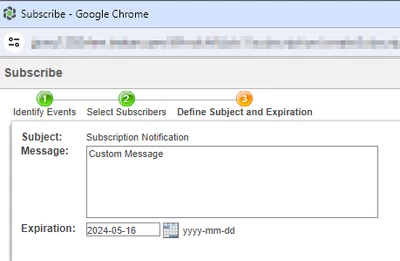
After a Windchill restart, here is what the GUI looks like to create a Subscription:

Notice that we cannot change Subscription Subject.

Jonathan_Cruz_2-1715780798493.png


1 reply

18-Opal
May 4, 2024

@Jonathan_Cruz ,


You can certainly automatically change the Subject by adding to what the user has entered.


As for, "Does anyone have any advice or experience with customizing the Subject Line displayed in Subscription Emails?"

The answer is, yes.


But can you be more specific?  Can you spec EXACTLY how you would like this to work.

For example, automatically append the object's number, name to the subject upon creation of the subscription.

Or better yet, user enters subject <any text user wants to enter>.

I need the subject to be:

<any text the user wants to enter> - Number: <object's number>, Name: <object's name>

If the object is renumbered or renamed, the subject to be automatically updated to reflect the new number and new name.


Something like that.


7-Bedrock
May 4, 2024

Hello, thanks for replying to me.

I can be more specific.


On the Subscription, the user enters for the subject <any text user wants to enter>.

Currently, my email will output the Subject Line as <any text user wants to enter> from the Subscription Subject field.

I want to override that Email Subject Line with something static like "Subscription Notification".


My use case is that I am dealing with an ITAR company, and they cannot have any information about their products make it into their inboxes from Windchill.


So I am not looking to append or apply a suffix or prefix to the Subject Line for Subscriptions.

I still want to allow users to enter any text they want in the Subject Line, but have the emails override that Subject Line with a static Subject of "Subscription Notification".

18-Opal
May 4, 2024

Got it.


This is is doable but whatever the user enters in the subject field when they create the subscription will be replace with “Subscription Notification”.

The users might as well enter nothing as whatever they enter will be overwritten.