
1-Visitor
October 25, 2022
Solved

Workitem Input Attribute

  • October 25, 2022
  • 1 reply
  • 7417 views

I would like to add some inputs to my promotion request approve task.  There are comment inputs and vote inputs.... but I wanted to add a could of boolean attributes (radio buttons would be nice) for common reasons for rework.  Then, I can collect report data about why Promotion requests are being sent back for rework.

  • Missing Dims
  • Notes
  • GD&T
  • Design Issue

Stuff like that.


I thought I saw an article that says it's not possible but want to ask the community if they think otherwise or have an alternative solution.


The referenced buzz kill...
https://www.ptc.com/en/support/article/CS310508

Best answer by avillanueva

yep

avillanueva_0-1666734239048.png


1 reply

avillanueva
23-Emerald I
23-Emerald I
October 25, 2022

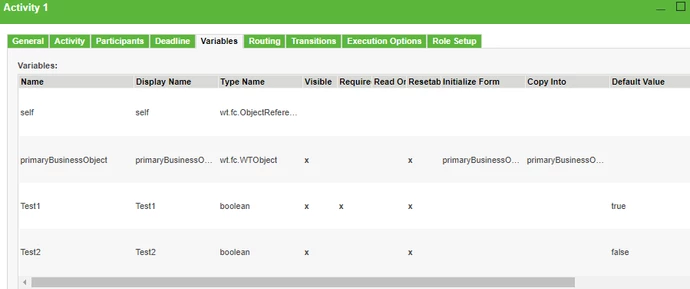
I am not sure that article means what we think it means. I just created a workflow with two boolean attributes and tested it. Displays like this:

avillanueva_0-1666732079478.png


You should be able to create a variable in the workflow and also in the task to gather inputs. Then you can write logic around it. Am I missing something? Seems pretty OOTB.

1-Visitor
October 25, 2022

So I can definitely do it in the workflow... I know how to get user input variables in there... and even pass them to the task.  But... That screen shot you have... is that from a task?  The user would have to input that in the task.

1-Visitor
October 26, 2022

Thank you everyone!  I am so close now... I was able to take my boolean variables, use an expression robot to count how many times they values were set to true. Send that int up to the process level  From there I was able to create a Type Management Reusable attribtute (int), use the same expression robot to set the value of the PBO attribute... and my background method server log reports the value correctly... but the value does not appear visible...  Nor does the value show up when I use a report.  It will return the Promotion Request but the "RWDI" attribute shows nothing.  The attribute is set to read/write, not value hidden.  Attached is what I see when I display the attribute on the layout.  I really only need it for reporting though... Still Where's my value?