
5-Regular Member
December 23, 2024
Solved

Adding Resolution Date in Creo Drawing

  • December 23, 2024
  • 1 reply
  • 759 views

Version: Windchill 12.1


Use Case: Document publication information (Promotion Date, Resolution Datee and Approvers) comes from windchill processes (PR ve CN) needs written to the drawing when the processes (Promotion Request and Change Notice) is completed.


Description:

We want to add the promotion date and the person who approved to our Creo drawing. We want this information to be written on the drawing template when the PR approved and document is released. Similarly, when the change process is started on this document, we want to see the resolution date on the drawing.

I have seen cases for the promotion date. Although we managed to include it for the first publication, we could not write the resolution date and the user name who approved the change to the drawing as a result of the change notification.

We used the following for promotion
promote.approvers and promote.promotionDate. Which fields should we use for the publication process and update the CN process.
Best answer by HelesicPetr

Hi @SA_8580177 

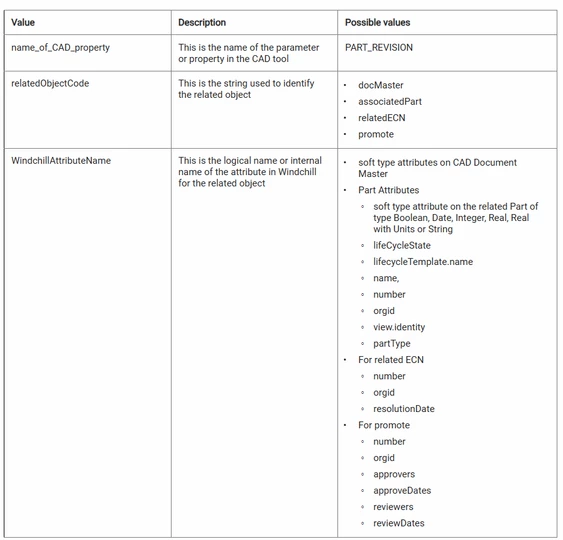
The help describes the values that should be used for change notice. ECN

relatedECN.resolutionDate

Customizing the Parameters in the Download Service

HelesicPetr_0-1735894858847.png

PetrH

1 reply

avillanueva
23-Emerald I
23-Emerald I
December 23, 2024

How is this different from the other thread that was just closed? Are you looking for this to flip from a promotion notice date to a change notice resolution date? I do not have 12.1 yet but they did say this was in preferences. The help document was not very helpful or has yet to be updated:

https://support.ptc.com/help/wnc/r12.1.1.0/en/index.html#page/Windchill_Help_Center/NewandChanged_WWGM/NewandChanged_WWGM_12_1_1_0_OutofBoxAdditionalAttributes.html


5-Regular Member
December 27, 2024

Yes I want to overwrite Resolutiondate on PromotionDate when the change notice was resolved.


Thank you 🙂

Catalina
Community Moderator
January 3, 2025

Hi @SA_8580177,

I wanted to see if you got the help you needed.

If so, please mark the appropriate reply as the Accepted Solution or please feel free to detail in a reply what has helped you and mark it as the Accepted Solution. It will help other members who may have the same question.

Of course, if you have more to share on your issue, please pursue the conversation.

Thanks,

Catalina | PTC Community Moderator