
10-Marble
September 16, 2020
Question

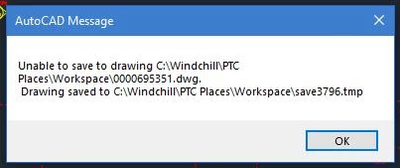
AutoCAD generates error Unable to Save Drawing to Workspace. Drawing saved to Windchill\saveXXXX.tmp

  • September 16, 2020
  • 3 replies
  • 12983 views

My company uses AutoDesk (Inventor & AutoCAD) products and PTC (Creo) products. For AutoCAD we use the Workgroup Manager and sometimes we get an error during usage that shows belowMicrosoftTeams-image (12).png. I can't trace the source of why it is happening. It basically blocks all the information for saving from AutoCAD once this error is shown to the user. Has anyone else see this? You can delete the local Windchill folder and re-setup the connection for the Workgroup Manager to the CAD tools, however, the user always ends up losing work because of this.
3 replies

10-Marble
December 16, 2020

Was there a resolution for this? I am also experiencing this problem.

agarr10-MarbleAuthor
10-Marble
December 16, 2020

No we have not found anything. PTC support desk said that I needed log files showing when it happens to diagnosis anything. I don't know the cause so we can't run the logs constant.to capture. The closest information I have found is here: https://forums.autodesk.com/t5/autocad-lt-forum/unable-to-save-files-creating-tmp-files-instead-autocad-lt-2014/m-p/4531107#M117508


I have a test running trying this option: https://knowledge.autodesk.com/support/autocad-lt/learn-explore/caas/CloudHelp/cloudhelp/2016/ENU/AutoCAD-LT/files/GUID-469DFA87-1986-4BDA-918B-1E3F9D6FCDC2-htm.html


Both of those are not for current versions, but I think still apply. We are on AutoDesk 2018, what version are you on?

10-Marble
December 16, 2020

We are also using AutoCAD 2018. For some users, opening the drawing, moving some stuff around and re-saving causes the issue. Clearing the Workgroup Manager cache does help temporarily. 

10-Marble
March 2, 2021

There is a new Workgroup Manager (CPS17) that may resolve your issue.

agarr10-MarbleAuthor
10-Marble
March 2, 2021

Have you tested to see if it resolved your issue?

10-Marble
March 3, 2021

Yes, the update resolved the issue.

1-Visitor
March 5, 2021

We have a similar error using Inventor.  We discovered it was Microsoft OneDrive.  This is how we resolved it.

Cause

  1. OneDrive activated

Resolution

  1. Turn off the "Files on Demand" feature in OneDrive settings
  2. Reboot the client

Once that is done, we didn't see that error any longer. 

agarr10-MarbleAuthor
10-Marble
March 5, 2021
We have tried that with no success in preventing it from happening again.
10-Marble
March 5, 2021

From an enterprise level, do you have any backup programs? We did found out that a backup program can interfere with the save.