This was an educational journey for sure.
tldr:
"Publish to CAD" on replace does in fact work... sort of. But:
- The failures in Creo were replicated by PTC Tech Support and confirmed as a result of having "regenerate_read_only_objects no" set in the config.pro
- In NX, it works great but the replaced part remains in the model-tree as suppressed and the user needs to take more firm action to delete desired
longer version:
I had a few calls with PTC Tech support and recorded videos of creating a dummy assembly with a few components and then checking it in. When I would in the WTPart structure go to replace a compoment with a different one and sync/update eveyrthing in my workspace, the behavior was:
- on first open, I get the view changes screen. This shows correct things to be replaced
- I select ok and the model ONLY displays the new incoming part
Turns out that in my config.pro I have "regenerate_read_only_objects" set to no. So:
- with that set to no
- I had to close the assembly after the initial "view changes" and do so without saving.
- then re-open the assembly
- on the second open, the correct changes are displayed
- check out the assembly, save and everything is fine
- with that set to yes
- The assembly updates on first go but... now I'm torn about this
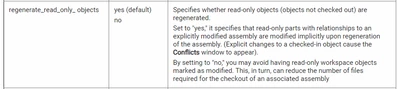
- Hopefully the "lock-on-add" and permissions are sufficient to keep unintended changes at bay
- it's either this or open each assembly twice to get the changes to go through.
In NX - since the config.pro doesn't matter for it - replace and publish to CAD works as expected. A replaced component is suppressed in the assembly and the new incoming component is added at the bottom. I did have some struggles with different association types (owner vs. image for multi-CAD) and still have to try replacing a Creo file with NX in a structure ...
Supersedes seemingly is only good as a flag and tracking of a change, but the change still has to happen on each individual BOM and CAD... so looks like this will be a long-term exercise.