18-Opal
April 3, 2015
Solved

Best practice for getting a list of Windchill users?

  • April 3, 2015
  • 1 reply
  • 16681 views

So evidently, it is not out of the box functionality to be able to see a list of all the Windchill users? I am not sure how you can manage users without seeing who has an account on your system....

So what is the best practice to get a list or report or ??? to see all the users of a Windchill system?

Ideally, I would like to have first and last name, userid, email, etc...

-marc

CAD / PLM Systems Manager
Best answer by TomU

In that case then I'd recommend using Query Builder. Pretty straight forward.

Site --> Utilities --> Report Management. From the top right, pick "New".

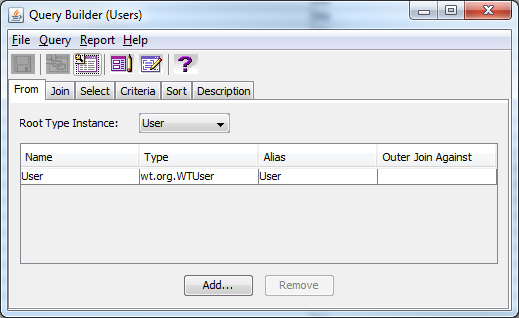
On the From tab choose "Add", then select "User"

qb1.png

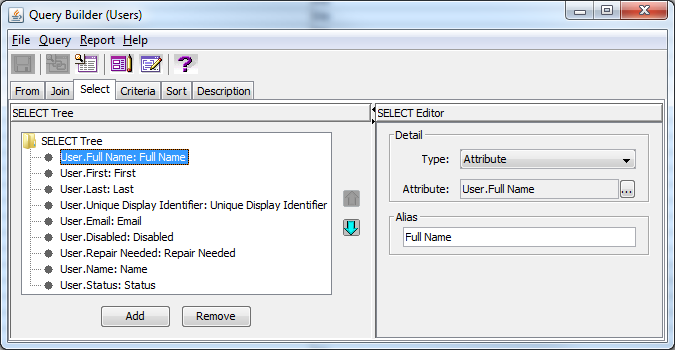
On the Select tab use "Add", then use the selection box next to the attribute to choose the information you want to view.

qb2.png

Chosse "save", then "choose" generate.

Select all of your chosen criteria, then click "Generate".

1 reply

23-Emerald IV
April 3, 2015

Are you willing/able to look directly at the database or do you want to do this from Windchill?

mdebower18-OpalAuthor
18-Opal
April 3, 2015

Hey Tom,

Either one at this point. I am a little leery of messing with the database, so my preference would be to do this from Windchill.

-marc

1-Visitor
April 3, 2015