
1-Visitor
October 12, 2022
Solved

Can't check in an entire Assembly because of 3 parts (that are not even used in it)

  • October 12, 2022
  • 1 reply
  • 971 views

Hello,

I have this entire assembly, that I can't check in (not even a single part). Always appears some sync error related to the same parts:
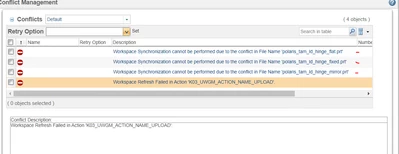
JP_10277715_1-1665573958805.png


Already tried to remove them from the workspace, drawing included (using the browser access), but a different error appears:
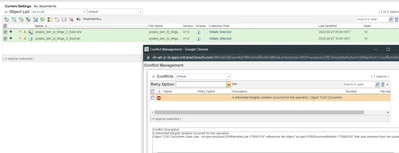
JP_10277715_2-1665574303206.png


It is really important to have this error figured out, otherwise I won't be upload my entire work to organization.

Thanks


Best answer by avillanueva

This ticket seems to describe your issue:

https://www.ptc.com/en/support/article/cs20353?language=en&posno=1&q=Workspace%20Synchronization%20cannot%20be%20performed%20due%20to%20the%20conflict%20in%20File%20Name.&source=search

You might have to back up your work outside the workspace to folder, clear contents, create a new workspace, import items back into new workspace and try again. 

1 reply

avillanueva
23-Emerald I
23-Emerald I
October 12, 2022

This ticket seems to describe your issue:

https://www.ptc.com/en/support/article/cs20353?language=en&posno=1&q=Workspace%20Synchronization%20cannot%20be%20performed%20due%20to%20the%20conflict%20in%20File%20Name.&source=search

You might have to back up your work outside the workspace to folder, clear contents, create a new workspace, import items back into new workspace and try again. 

1-Visitor
October 12, 2022

Hello @avillanueva . Thank you very much for the quick reply.
This would be probably my last resort...but I'm almost sure now, that it might me my Only one.

Thanks once again