Check out Documents
Good day
I am new to Windchill and I am trying to understand the Checking out and In of documents.
As I understand, once the document (lets say a word doc) is created in windchill and I want to edit and make changes in the document, I would check it out, open the document and make changes and then check it back in. The rev will then change from say A.1 to A.2
However this is not working for me.
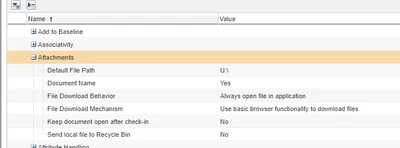
If I check out the document then nothing happens. it doesn't go anywhere except show me in windchill that it is checked out. ?????
If I check out and edit, it prompts me to upload a document from my local PC....????? Confused.
If I check out and Download, it downloads a wcdti file to my downloads folder and still no document. When I click on it, it prompts me to open the Word document. This is fine as I need to edit it but when I close the document it prompts to check back in and closes Word.
What is the best way to check out, edit the document even if it takes 3 days and then check in the amended document with a change in version.?
Really Confused here.