

Colors from SolidWorks configurations not correct.
HI
We have an odd situation.
We're using SolidWorks 2023 with Windchill 13.1.
In SolidWorks most components have different configurations with different materials and colors.
These components are used in different assemblies.
When we see the small thumbnails on the Details page for the different component (SolidWorks Part) configurations, we see the correct colors, but when we look at the different assembly configurations using the same part configurations, it's the color from the Default configuration (generic) which are shown.
How come we see this change in appearance (color) whether we look at single component or the component in an assembly structure?
(Yes, we have rebuilded all configurations, and we have deleted and republished all models).
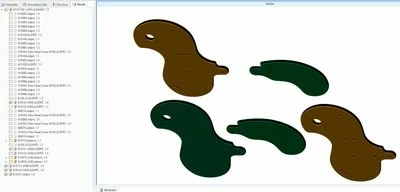
Top row (2 objects) is showing assembly colors.
Bottom row (3 objects) is showing correct colors for Head and Tail (1 & 2) and default color (3)