13-Aquamarine
March 20, 2023
Solved

Creo Drawing when opened has older iteration of model

  • March 20, 2023
  • 3 replies
  • 2038 views

We use Windchill and Creo 7. When I opened a Creo drawing for an assembly, the 3d model shown is of old iteration. Tried to update the workspace but still the problem persists.

Best answer by HelesicPetr

Hi @KSHITISH_S 

Here you can set the preference what you want to add to the workspace
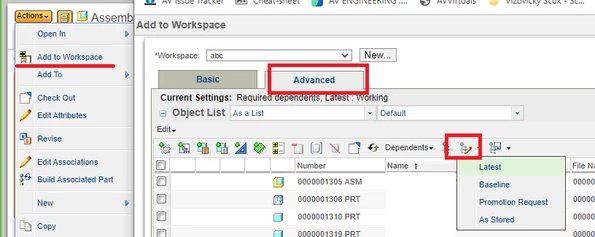
HelesicPetr_0-1679380721566.png


hope this can help

PetrH

3 replies

HelesicPetr
22-Sapphire II
22-Sapphire II
March 20, 2023

Hi @KSHITISH_S 


The drawing has old reference to a previous model iteration.

You need to checkout the drawing

update the model in the workspace to the latest version,

Open drawing and update the model in the drawing to the latest model.

Save and check in the drawing.


PetrH

23-Emerald III
March 20, 2023

You should check your download rules. If they are set to Load As Saved, it is very possible that you could get an older iteration of the assembly when loading a drawing. We have the rules set when opening a file in Creo to use Load Latest. However, when doing a download to workspace in Windchill, our rules are set to As Saved. This has caused some issues for some of the users who do not understand the rules of Windchill.

HelesicPetr
22-Sapphire II
22-Sapphire II
March 20, 2023

@BenLoosli is right.


There are several rules that applies during add to workspace operation

for example if you open the drawing the configuration is set as stored configuration. 

If you add an assembly as a first part you will get usually latest configuration


PetrH

joe_morton
18-Opal
18-Opal
March 21, 2023

Does the issue happen if you open the drawing in a brand new workspace? There are some conditions where Creo will not update some files in the Workspace.