

23-Emerald IV
August 25, 2017
Question

Enumerated Value List - How to unselect a previously selected value

  • August 25, 2017
  • 1 reply
  • 1791 views

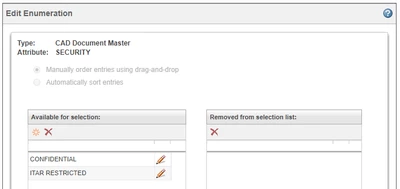
I created a new attribute for one object type in Windchill and then added an enumerated value list constraint to it with two values.
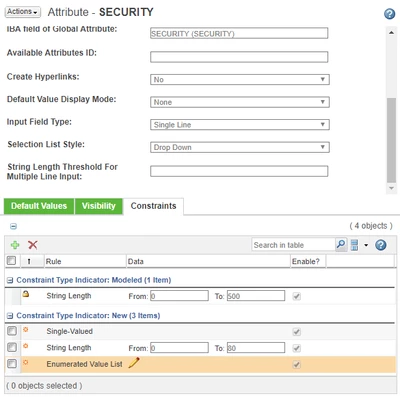
Enumerated Values List 01.PNG

Enumerated Values List 02.PNG


Modifying this object in Windchill now gives me the option to leave this property undefined (unset) or select one of the two list values.

Enumerated Values List 04.PNG

Selecting either of the values works fine, and switching between the values works fine, but I can't figure out how to go back to blank (undefined).  Even though there is a blank value displayed, attempting to return to pick it (after having previously selected a different value) is not being permitted.  Windchill just throws an error:
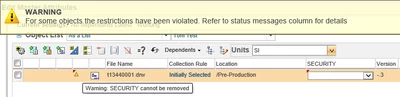
Enumerated Values List 07.PNG


Is there any way around this?  I don't really want an extra "None" entry in my list because "None" and undefined are not the same thing and won't return the same results in a search.

1 reply

17-Peridot
August 28, 2017

This is a long time issue with CAD-Documents


https://support.ptc.com/appserver/cs/view/solution.jsp?n=CS22920

TomU23-Emerald IVAuthor
23-Emerald IV
August 28, 2017

Reported issue is work to spec behaviour. HTML UI Edit attribute action does not allow user to remove attribute. User can remove attribute value in CAD Application.

Unfortunately this attribute is created on the master type (CAD Document Master), so there is no option to remove the attribute in the CAD application (it doesn't exist there.)

17-Peridot
August 28, 2017

I don't know why, but PTC doesn't really supports Master Attributes. It starts with the name attribute. If you define a global enumeration for it, it works just in the create wizard. In all other wizard it's being rendered as text field and sometimes even the internal name is being showed. But that's another topic...


You probably would need to customize some action on the EPMDocument itself to clear the Master Attribute. Or you can perhaps extend the edit attribute form processing. But that's probably done with HTML Templating and is also not supported...