
14-Alexandrite
April 21, 2023
Solved

Error message received when attempting to configure CAD worker in Windchill PDMLink 12.0

  • April 21, 2023
  • 2 replies
  • 2081 views

Hello All, Greetings!


I have been trying to configure CAD worker for Creo Parametric to work with Windchill PDMLink 12.0, but getting the error with connection to the Windchill Master Server. I have also tried all the steps from PTC Articles related to this error yet couldn't find a resolution. Connection Error MessageConnection Error Message

 What could be causing the CAD worker's configuration issues when using the Creo View Adapter to work with Windchill?


Would appreciate anyone's support or guidance in resolving this configuration issue.


Best answer by Rohaan

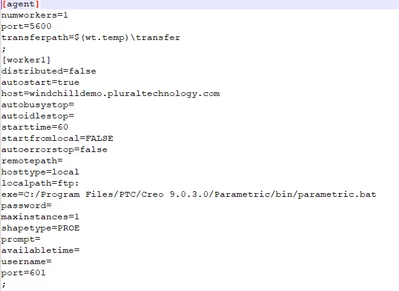
Agent.ini file below fyr

Rohaan_0-1682312414885.png


LocaHost Alias entry

"127.0.0.1 --windchilldemo.pluraltechnology.com --proeworker_1"

2 replies

Marco Tosin
21-Topaz I
21-Topaz I
April 21, 2023

Take a look at this article:


Failed to test connection to server with message β€œThe CADAgent rejected the connection, is it configured for a XXX worker on machine XX (allias not set)?" during setting up a worker with Creo View Adapter


https://www.ptc.com/en/support/article/CS42750


Marco
Rohaan14-AlexandriteAuthor
14-Alexandrite
April 21, 2023

Thanks for sharing, however I have tried all resolution points yet no luck with getting the connection.

15-Moonstone
April 21, 2023

Rohaan,

As per the error the server is not able to find the appropriate entry for this worker 

Would be able to share the agent.ini entry for this worker? 


Have you added the host entry in the server to map the alias name? 

Does ping/telnet from worker (601) <--> Server(5600) 


Thanks,
Vishwas 

Rohaan14-AlexandriteAuthorAnswer
14-Alexandrite
April 24, 2023

Agent.ini file below fyr

Rohaan_0-1682312414885.png


LocaHost Alias entry

"127.0.0.1 --windchilldemo.pluraltechnology.com --proeworker_1"