
18-Opal
November 30, 2017
Solved

How do I get rid of the security warning that is displayed for each Java application run?

  • November 30, 2017
  • 3 replies
  • 4745 views

When you access a lifecycle template or workflow template in Windchill, the Java application launches.
Each time a security warning is displayed, you have to click Run every time to run it.
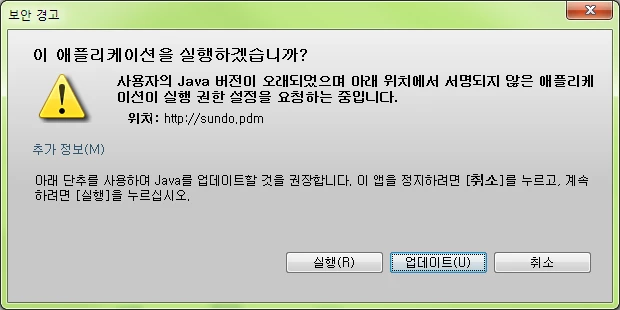
securi.png
I would appreciate it if you let me know how to set it to run without the corresponding security warning.

Best answer by ShirishMorkhade_238755

Here is the correct link:

https://www.ptc.com/en/support/article?n=CS142095


Regards,

Shirish

3 replies

1-Visitor
December 1, 2017

There are a number of different configurations that seem to handle this differently. For the latest version of Java, Oracle shows a check box that could stop showing the prompt:


Trusted application with valid certificate


The yellow triangle indicates the application is untrusted or has an expired certificate, which is probably why there is no check box displayed. I don't see an English version of a 3 response dialog box, so I don't know what choices you have.


Your systems administrators should look at https://www.java.com/en/download/faq/signed_code.xml (So should PTC Windchill developers)


You may also look at https://www.java.com/en/download/help/jcp_security.xml for changes for the user level security.

CHASEONHO18-OpalAuthor
18-Opal
December 4, 2017

thanks @dschenken!

Three Responses The interactive box is Run, Update, Cancel.
Does that mean i need to issue a new certificate to get rid of the yellow triangle warning?

1-Visitor
December 13, 2017

update your Java to the latest 32bit (even on a 64bit OS) . Try Java 8 first.

5-Regular Member
December 27, 2017

Article https://www.ptc.com/en/support/article?n=CS142095 having details about the security warnimgs, which might helpful for you.

21-Topaz I
December 27, 2017

When I click on that link it says the artical does not exist.


If you are on Java 7 (might be version 8 too) you won't be able to get rid of that security warning completly.

19-Tanzanite
December 27, 2017

The link has too much in the link.  Try this one instead.

 https://www.ptc.com/en/support/article?n=CS142095