
15-Moonstone
May 3, 2022
Question

How to delete all the iterations of drawing format that are not released?
  • May 3, 2022
  • 3 replies
  • 4116 views

JS_9824412_0-1651591478021.png

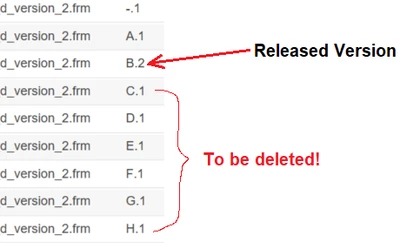
Hi there, the above is the screenshot about the issue: the released version of the drawing format is B released in 12 months ago. Since then, the drawing format has been accidentally revised to Rev H. We need to delete the drawing formats of revision C, D, E, F, G, and H. however, Windchill doesn't allow it, saying they are used in other workspaces. 


How to delete them and only keep the released version B?


Thanks.

JS


3 replies

23-Emerald III
May 3, 2022

The Windchill admin can delete them working backwards from revision H and can force a removal from a workspace. The catch will be that IF these formats have been used in a drawing template or a drawing, then that may limit your ability to delete them.

Formats should be in your standard configuration library and ONLY the Librarian (or Admin) can revise these files.

15-Moonstone
May 3, 2022

Thanks for your very helpful feedback.


Revisions C,D,E,F,G, and H of the drawing format are the same as revision B. There has been no change made to Revision B. The problem right now is that there are more than one hundred of drawings using Revision H format. 


Thanks.

JS

23-Emerald III
May 3, 2022

If the revision H is used and thus restricted by Windchill to being deleted, you may just need to bite the bullet and make revision H as the default. 

I also change the state of my formats so that will also show if they get revised, since the state will change. 

But then I am the only admin and librarian and sometimes I know what I am doing.

22-Sapphire I
May 3, 2022

Use Purge for this in general.


Delete is from the latest back in time.

Purge is for non-latest.

15-Moonstone
May 3, 2022

Good idea. Where to find the "purge" command in Windchill? Thanks.

22-Sapphire I
May 3, 2022

Purge can only be done by Site Admin. It's under Site / Utilities, Purge.

It's relatively complex - have to create a query with criteria and then run it.


For this particular case, a good approach would be to create a new Library, then move the Format to that Library, then run Purge on only that Library context, then move the Format back where it was. This eliminates most of the complexity for the query, etc., and ensures that nothing else will be purged.


////


An alternate as suggested by other user would be to preserve the latest and then Delete, then add the latest back as the new Rev, and that might be just fine also.


18-Opal
May 7, 2022

@JS_9824412 


@TomU  has it right. A drawing references the master of the format NOT an iteration of a format. Therefore you should be able to delete from H.1 backwards until B.2 is the latest, unless the iterations to be deleted play the B role in any links. If that the case those links must be deleted first.

If they are in workspaces such a link exists and it needs to be deleted.


Are you getting the OOTB Remove from workspace option when you try to delete? I guess you are but drawings that’s reference the format are in the workspace too.


If a format is on an ECR the link to the ECR must be deleted before the format can be deletedas well.


You mentioned there are hundreds of drawings using Rev H format. I take it you mean Rev H format has info that you want to retain.

You also, mentioned ECR, is B the affected data on ECR?

Can you clarify EXACTLY what you want things to look like when your done?


For example, if you want B.2 to use the content of H.1 (or any other iteration) that’s easily doable. And it’s done without using Creo Parametric.

There are several ways to do this but let’s hear EXACTLY what you want done first.

15-Moonstone
May 10, 2022

The content of Revision H.1 (and G, F, E, D, C) is exactly the same as of Revision B.2. 


One year ago, the drawing format was accidently revised 6 times (with NO change in content at all) to become H.1 in one single day. 


Right now, we need to update the released Revision B to the new Revision C with new content added in.


Due to time constraint, H.1 was treated as the affected object in ECR, and J.1 to be the resulted object in the ECR. I have no idea how it will end. Can Revision J be released? However, we want the Revision C has the latest update and to be released.


Thanks.

P.S. Does "Released" ONLY means "no change can be made to it"?

18-Opal
May 10, 2022

Released is just a state.  Typically states are used to control access.  So, if "Released" EPMDocments or CAD Documents cannot be modified then yes.  But you'd need to check the policies on your system to verify that.


As for what to do from here.

If it were me I'd remove H from the ECR using the GUI

I'd remove C thru H from all workspaces. This will mean removing the drawing as well.

Then I'd delete H thru C.


Removing from WS could be a PITA using the GUI if you have a lot of Workspaces involved.

Who knows how many workspaces C thru H are in?

A Query Report can be written to find this info.


Or a utility can be written to be run in a Windchill shell.

In this case the utility would work by entering CAD Doc's number (maybe the rev too to get more granular)

The utility would then print the:

  • number rev.iteration
  • WS name
  • the user who owns the workspace.

After you know the Workspaces you could run the same utility with a -remove argument which would remove the object(s) from WS.

From there you can delete the H thru C using the GUI.


David