1-Visitor
November 6, 2015
Solved

How to set up a Windchill PDMLink test system

  • November 6, 2015
  • 3 replies
  • 5163 views

Hi everybody,

I need to set up a Windchill PDMLink test system. So I´m trying to install windchill on a local machine (don´t want to touch the prod server ).

As manual serves this http://ark-plm.com/monolithic-installation-windchill-pdmlink-10-2-windows-server-2012/

When using the PTC sollution installer, I´m getting a problem: "Connection with HTTP-port not possible" (not sure about the correct translation - message is in german). I am using standard port (see picture below) and firewall is off.

Any suggestions why I can´t reach the machine? Why is the installation process doing this test?
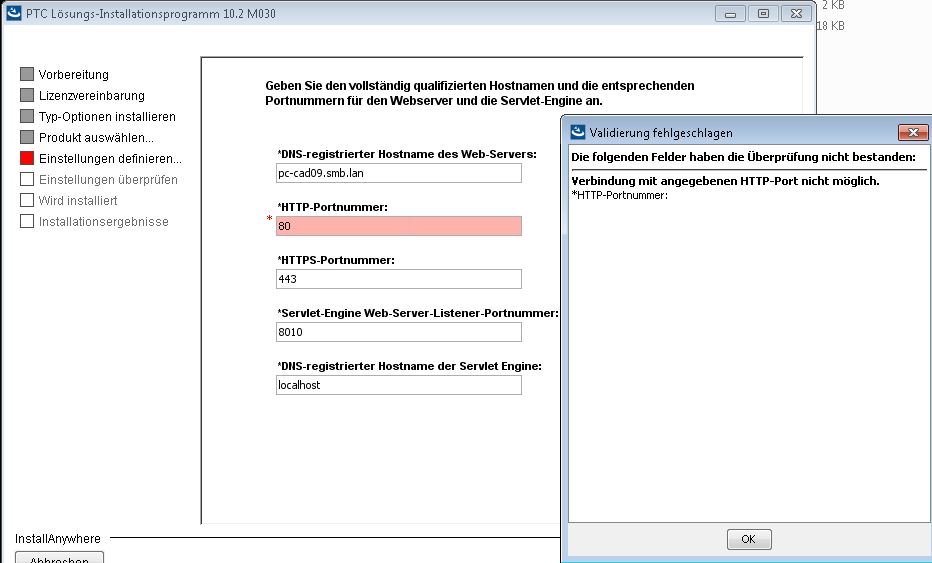
Unbenannt.JPG

Best regards,

Benjamin

Best answer by kdehal

Hello Benjamin,

I think Tom's and Bob's answers are correct, you probably have some other program that is currently using port 80.

A quick procedure to verify that is to open up the command prompt, and type in "netstat -a -n -o"

source: http://www.techrepublic.com/blog/the-enterprise-cloud/see-what-process-is-using-a-tcp-port-in-windows-server-2008/

if you do have a program using port 80, take note of the PID of it, then open the task manager to find the process with that PID.

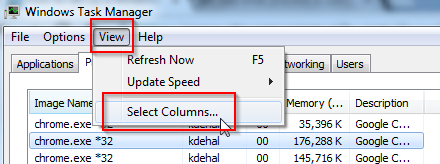
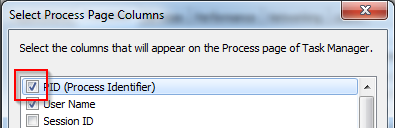
The process tab doesn't show PID by default, but you can add it through the View Menu:

2015-11-06 14_40_57-Windows Task Manager.png

2015-11-06 14_41_15-Select Process Page Columns.png

3 replies

23-Emerald IV
November 6, 2015

I would guess that port 80 is already in use.  Windchill needs to install it's own web server (Apache), so you need to turn off whatever is already using port 80.  Start by taking a look at IIS.  (Make sure it's not checked.)

1-Visitor
November 6, 2015

Ben,

A test WC system will also need a test Apache (HTTPServer) and test WindchillDS as well.  In this step you are setting up the Apache configurations.

Is "pc-cad09.smb.lan" the machine you are looking to install Windchill on as well as the machine you are actually running the PSI on?  If it is a connection error to Port 80, it is likely that something on that machine is already using Port 80.  You may want to do a netstat on that machine to verify.

My company, Eccellent Solutions (www.eccellent.com) has decades of experience in Windchill and I'd be glad to help you out further with this or any future work you may have with Windchill.  Feel free to send me an e-mail at robert.sindelar@eccellent.com if you are interested.

kdehal1-VisitorAnswer
1-Visitor
November 6, 2015

Hello Benjamin,

I think Tom's and Bob's answers are correct, you probably have some other program that is currently using port 80.

A quick procedure to verify that is to open up the command prompt, and type in "netstat -a -n -o"

source: http://www.techrepublic.com/blog/the-enterprise-cloud/see-what-process-is-using-a-tcp-port-in-windows-server-2008/

if you do have a program using port 80, take note of the PID of it, then open the task manager to find the process with that PID.

The process tab doesn't show PID by default, but you can add it through the View Menu:

2015-11-06 14_40_57-Windows Task Manager.png

2015-11-06 14_41_15-Select Process Page Columns.png

1-Visitor
November 9, 2015

Hi guys,

thank you for your advice!

The programm blocking port 80 is our anti-virus software (Trend Micro).

NowI did choose another port - hopefully this will work too.

Best regards

Benjamin

1-Visitor
November 9, 2015

Keep in mind that if you choose a port other than 80 to install Windchill, then users will have to add that to the end of the domain name portion of the URL.  For instance, if you install on port 81 using the hostname in your screenshot and assuming the servlet name is "Windchill", the URL to access Windchill would be:

http://pc-cad09.smb.lan:81/Windchill

You will also need to make sure all clients in your environment have communications open/available on whatever port you choose to do the server-side install.