1-Visitor
April 3, 2015
Solved

Is there still a Product Structure Explorer in Windchill 10.2

  • April 3, 2015
  • 1 reply
  • 3421 views

Hi,

I would like t know if there is still a way to create a bom manually by using a Product Structure Explorer in Windchill version 10.2 ?

Is there a way to feed this with info comming from Excel ? This I am asking because we will abandon the OSD drafting and for the rarely new 2D drawings we would create the bom manually.

Regards,

Bernard

Best answer by BenPerry

Bernard,

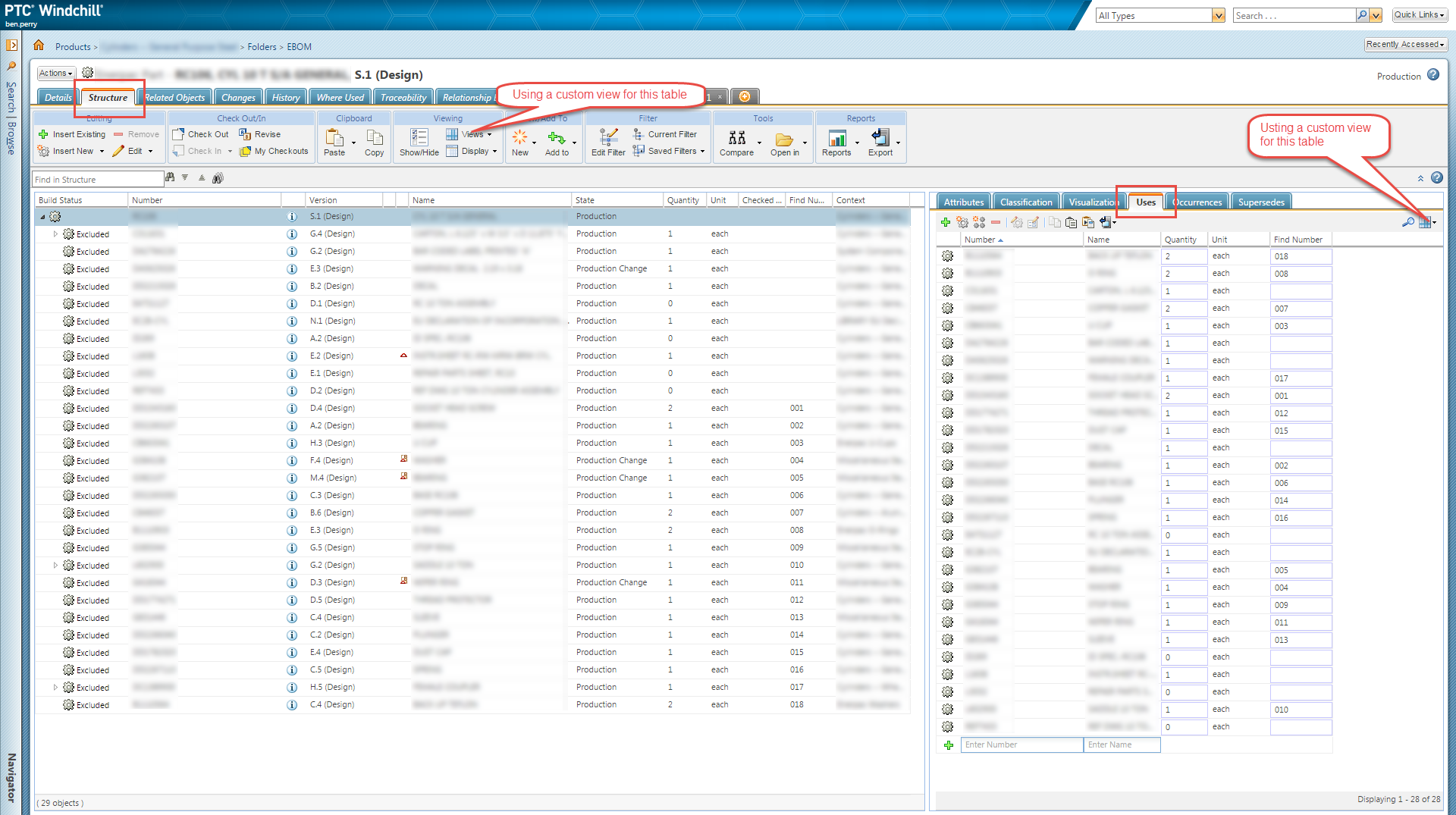
I have posted a screenshot of PSB in 10.2 M020. I am using some custom views. But you can see that the structure is located on the left side. And you can make edits to the BOM on right side of the screen using the Uses tab. This is fundamentally different than clicking on Actions > Edit BOM in Windchill 9.1. We use this for small BOM changes.

For larger BOM changes, or initial BOM creation, when our BOM isn't CAD driven, then we use an Excel spreadsheet. The way I have leveraged the Import from Spreadsheet functionality is by having users input information onto the same spreadsheet they've used for a long time, and are familiar with. Then I use a macro to reformat the data (on a separate worksheet) into a structure that Windchill prefers for its import engine. This way the users are happy, and Windchill is happy. The macro does the work to make them both happy. The user only needs to click on Import from Spreadsheet, and load the Excel file. And then check the output message from the import (success or failure?).

What format and structure is required for importing WTPart structure into Windchill using the Import from Spreadsheet function? The easiest way is to go to an existing BOM and export it via the Actions menu. It has been a while, so I can't remember the specifics. But that is the principle. You can do this for components too, not just BOM structure. There is also information regarding all of this in the Windchill Help Center in your installation. I had to make some changes to the import spreadsheet structure when we upgraded from 9.1 to 10.2, but they were all related to PartsLink and classification - not the basic functionality. So whatever you develop now will be able to be useful even after you upgrade.

2015-04-06_9-34-45.png

1 reply

15-Moonstone
April 3, 2015

Bernard,

I can share one of our methods to create BOMs. Maybe you will be interested.

In some cases, the engineer creates the BOM in a spreadsheet format. I have utilized the "Import from Spreadsheet" functionality to import the Excel BOM into Windchill. You just need to have it in the right format for the import engine. I can provide more details if you wish.

To answer your original question... Yes, there is still a Product Structure Explorer in Windchill 10.2. What version of Windchill are you currently using?

1-Visitor
April 4, 2015

Ben,

We are actually on version 9.1 M60. Yes, I am interested in methods to create a bom.

Regards,

Bernard

BenPerry15-MoonstoneAnswer
15-Moonstone
April 6, 2015

Bernard,

I have posted a screenshot of PSB in 10.2 M020. I am using some custom views. But you can see that the structure is located on the left side. And you can make edits to the BOM on right side of the screen using the Uses tab. This is fundamentally different than clicking on Actions > Edit BOM in Windchill 9.1. We use this for small BOM changes.

For larger BOM changes, or initial BOM creation, when our BOM isn't CAD driven, then we use an Excel spreadsheet. The way I have leveraged the Import from Spreadsheet functionality is by having users input information onto the same spreadsheet they've used for a long time, and are familiar with. Then I use a macro to reformat the data (on a separate worksheet) into a structure that Windchill prefers for its import engine. This way the users are happy, and Windchill is happy. The macro does the work to make them both happy. The user only needs to click on Import from Spreadsheet, and load the Excel file. And then check the output message from the import (success or failure?).

What format and structure is required for importing WTPart structure into Windchill using the Import from Spreadsheet function? The easiest way is to go to an existing BOM and export it via the Actions menu. It has been a while, so I can't remember the specifics. But that is the principle. You can do this for components too, not just BOM structure. There is also information regarding all of this in the Windchill Help Center in your installation. I had to make some changes to the import spreadsheet structure when we upgraded from 9.1 to 10.2, but they were all related to PartsLink and classification - not the basic functionality. So whatever you develop now will be able to be useful even after you upgrade.

2015-04-06_9-34-45.png