

Multilevel report.
For some reason, when i pull a multilevel report from windchill, my report comes out incorrect when i export it. now, understand. its not incorrect with its quantities, but, it is. here is what i mean.
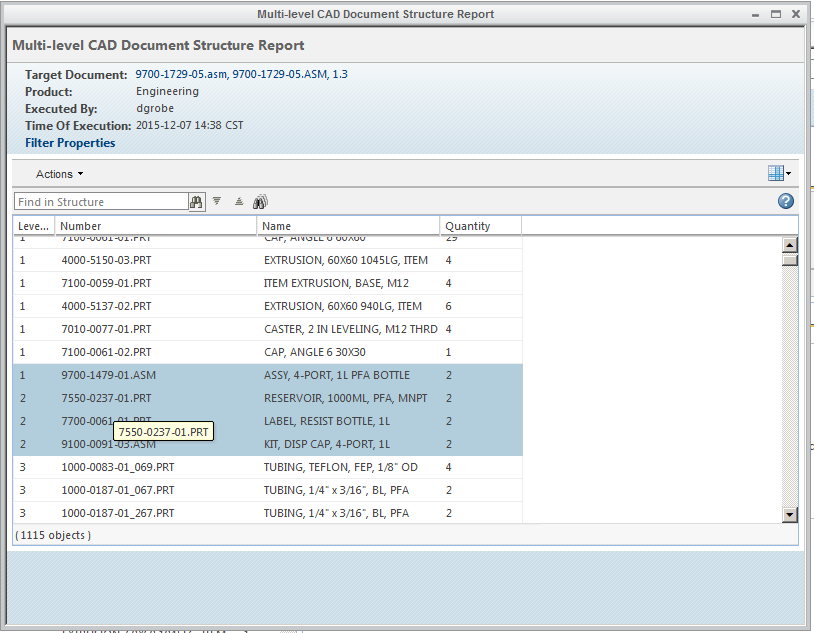
my 2nd level assemblies, are correct. but under those 2nd level assemblies, it has the incorrect qty of parts listed. meaning.. i need (2) of the 2nd level assembly. all the 3rd level parts are doubled in qty.
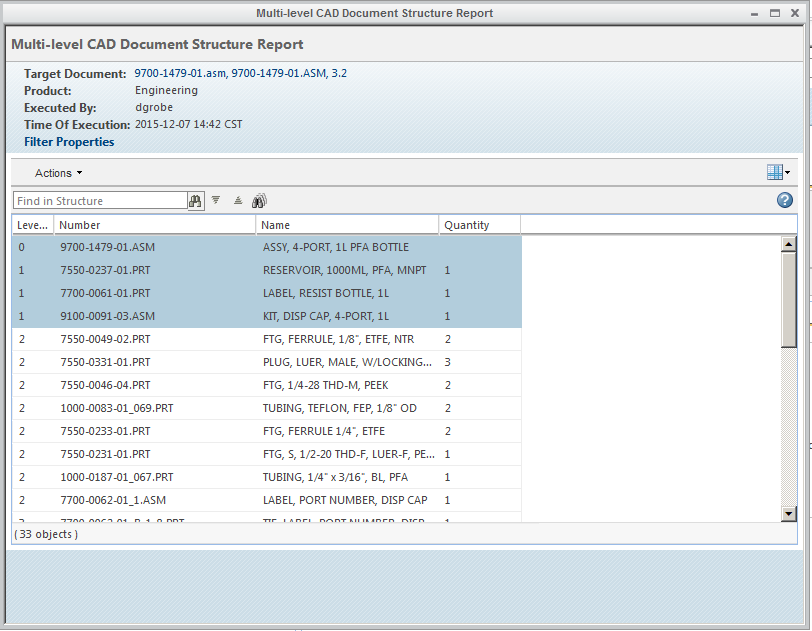
here is the example of what i am talking about. my top level is 9700-1729-05, under that, i have (2) 9700-1479-01 bottle assemblies. but, it shows a qty of (2) of the bottle, label and kit. why does it do that? is there a way for it to not report it out like that. see the lower attached image of the actual report from that part. it shouldnt double the parts under the assembly.
here is the 9700-1479-01 bottle assembly Multilevel report. notice, there is qty of (1) of each item, the bottle, the label, and the kit.
Is there some different way to structure the report so it shows it correctly?