12-Amethyst
August 29, 2024
Question

Odd NX assy navigator behavior with Windchill

  • August 29, 2024
  • 1 reply
  • 2556 views

Version: Windchill 12.0


Use Case: NX 2206 Users will open a large, top level assembly as "structure only", then expand 1 or 2 sub-assemblies, and the assembly navigator will jump to display a different sub-assembly, and NX becomes essentially useless.


Description:

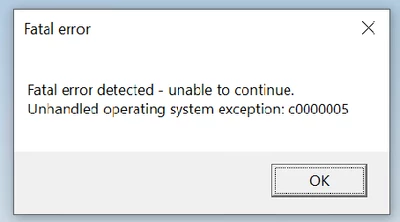
User opens a large top level assembly, using "structure only" in NX.  Then the user will expand 1 or 2 sub-assemblies, and the Assembly Navigator will change to list a different sub-assembly, and the NX session becomes essentially useless.  You can click on things, but navigating the assemblies or parts, is non-functional.  Sometimes a fatal, or other error follows.


Top level assembly is just under 30gigs, and it is all in the local workspace.  Loading "structure only" should only be loading a minimal amount of data into the NX session.


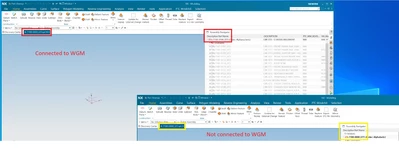
Everything functions as you would expect, if you run an NX session disconnected from WGM.  I've done this by running a second NX session, which fails to connect to Windchill.  Then do the same load, and assembly expansion in both sessions at the same time.


Also, load time is about 10X faster, when not connected to WGM.


In this image, you can see that the NX session connected to WGM is showing one part number in the tab, but a different part number in the Assembly Navigator.  Compared to the stand alone NX session, which shows the matching tab and navigator column.  NX session connected to WGM also experienced a Fatal error.
Dave_K_1-1724938419622.png

Dave_K_2-1724938504553.png

We are looking for any insight on how to solve this issue, as it is limiting, and slowing our productivity.


1 reply

17-Peridot
August 30, 2024

@Dave_K 


The c0000005 error (when I had it popping up a few times 2 years ago) had to do with the registry being somehow corrupt. It was a difficult thing to reproduce but essentially boiled down to a stuck WFS service that had to be force uninstalled/removed with a Microsoft uninstall utility. I had a ticket with PTC on this and the recommendation was to:

- reinstall after the registry cleanup

- delete the %Appdata%/Local/Siemens folder

- run WGM as admin to first connect NX to it

- run per usual and hope for the best


Large assemblies will always run way slower in a stand-alone session than when connected to the WGM. Do you have any anti-virus software running? This may help: https://www.ptc.com/en/support/article/CS50545

We also have some other monitoring software that I had to exclude NX (ugraf.exe) and WGM (uwgm_client.exe) from to help the slow loads along. Our assemblies are in the 7GB range and with load_options.def file set to partially load + anti virus exclusions we got down to about 4-5 minutes instead of 15 without. 


There is a known "feature" in WGM that will cause major slowdowns too that has to do with mass reporting. Do you have mass reported from NX (NX_Mass via MassPropMass and MassPropRollupMass) to Windchill with the MSP:Mass mapping PTC suggests? https://support.ptc.com/help/windchill/plus/r12.1.2.0/en/index.html#page/Windchill_Help_Center/WWGMforNX/WWGMNXAdminConfigMappingwithUnits.html# doesn't point out that if there are modeling errors in NX that NX happily resolves - they seem to trigger mass calculations on the Windchill side for the number of errors that exist. Specifically: if you have pk_topol errors showing up in your syslog, you can go from a 30second load/save to 15-20 minutes. 

In NX if you do "Examine Geometry", "Feature replay" and "Part cleanup" it may help at least identify this. But there isn't a fix yet on Windchill not triggering a save even when you don't want one. The only thing I was able to do was remove the MSP:Mass mapping for NX_Mass until there's a fix in some newer version of WGM. 


Dave_K12-AmethystAuthor
12-Amethyst
August 30, 2024

If it is corrupting the registry, I'd consider this issue to be much more serious, as it is involving more and more users.  It was one in late July, and at least 6 now.  The issue also comes and goes.  The first user with the issue changed his assembly load options from "partial lightweight" to "Partial loading" (still structure only), and the issue went away for almost 2 weeks, before returning.  But, if it is registry related, why does it only affect NX sessions connected to WGM?  Also, we don't always get the c0000005 error, sometimes it's "an invalid tag was passed to the tag module", or "memory access violation".  I think we always get a "failed to get column value for column DESCRIPTION" error though.


In our case the native NX session is MUCH faster loading than, than the session connected to WGM, I'm guessing that was a typo?  We do have anti-virus, and other monitoring tools in place, I'll dig deeper into that.  Yesterday I recorded an NX session connected to WGM, and a stand-alone, side by side, and performed the same functions.  Stand alone was done in a couple minutes, and the session with WGM took half an hour, then had the assembly navigator issue, which also renders the session useless.


OK, that "feature" could be part of it.  We do have mass reported from NX, and I have noticed NX performing saves, while opening parts, and we wondered why it was saving.  I haven't noticed any pk_topl errors, but I will keep an eye out.  Thanks for the anti-virus tips, I will pass them along to IT.

17-Peridot
August 30, 2024

I didn't add those to the ugii_env.dat. 

Just put them in on my system directly because - like you said - it does slow things down and can also make the syslog giant. 

In the end, for me those didn't yield anything of consequence.