

Odd NX assy navigator behavior with Windchill
Version: Windchill 12.0
Use Case: NX 2206 Users will open a large, top level assembly as "structure only", then expand 1 or 2 sub-assemblies, and the assembly navigator will jump to display a different sub-assembly, and NX becomes essentially useless.
Description:
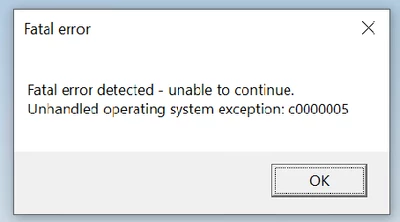
User opens a large top level assembly, using "structure only" in NX. Then the user will expand 1 or 2 sub-assemblies, and the Assembly Navigator will change to list a different sub-assembly, and the NX session becomes essentially useless. You can click on things, but navigating the assemblies or parts, is non-functional. Sometimes a fatal, or other error follows.
Top level assembly is just under 30gigs, and it is all in the local workspace. Loading "structure only" should only be loading a minimal amount of data into the NX session.
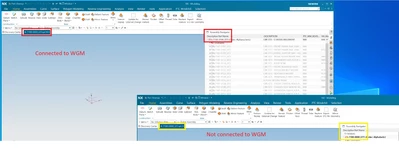
Everything functions as you would expect, if you run an NX session disconnected from WGM. I've done this by running a second NX session, which fails to connect to Windchill. Then do the same load, and assembly expansion in both sessions at the same time.
Also, load time is about 10X faster, when not connected to WGM.
In this image, you can see that the NX session connected to WGM is showing one part number in the tab, but a different part number in the Assembly Navigator. Compared to the stand alone NX session, which shows the matching tab and navigator column. NX session connected to WGM also experienced a Fatal error.
We are looking for any insight on how to solve this issue, as it is limiting, and slowing our productivity.