
1-Visitor
January 5, 2016
Question

Query Builder Criteria Logic for getting last month

  • January 5, 2016
  • 2 replies
  • 4834 views

Hi,

It's that time of year again when 1-1=0.

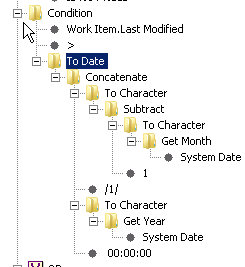
I use the Get_Month - 1 calculation to capture the work items created last month.

Problem is in January the month = 1

For some reason 1 minus 1 does not equal 12...

Has anyone a better way to get a criteria for 'last month'?

This goes into a Cognos report, so I'm not able to use the 'last month' attributes when running the report with Report Builder
2 replies

1-Visitor
January 6, 2016

Can you insert an if/else check in there to look at the result of Get_Month - 1 and if it equals 0 then set it to 12?  You'd also have to then subtract 1 from the year too ...

vmcdaniel1-VisitorAuthor
1-Visitor
January 6, 2016

I have not found any if/else/case logic on the query builder. Can you send me a screenshot?

1-Visitor
January 6, 2016

That's a good point - I think you could only use if/else/case logic outside of query builder, but inside of it maybe you can use the "Time Difference(days)" comparing the Work Item.Last Modified attribute to sysdate, and you can at least get the results from the past 30 days?  Granted if you ran it in the middle of the month you'd get from mid-month to the previous mid-month ...

Another alternative is to just create a report that gives you the results for a particular month (like Dec 2015), instead of "last month", and then each month duplicate the report and just update the new one for the next month (Jan 2016).

5-Regular Member
April 30, 2021

In Windchill 11.1 I was able to set a criteria with days while using the Database Function Time difference;


rfischer-2_0-1619782972648.png