
12-Amethyst
May 16, 2024
Solved

Query Builder Report - PartsLink Attributes Leave

  • May 16, 2024
  • 2 replies
  • 1152 views

Version: Windchill 11.2


Use Case: I try to have a report which expose only the attributes of a dedicated leave of partslink


Description:

I cannot find in the report criteria the partslink attributes
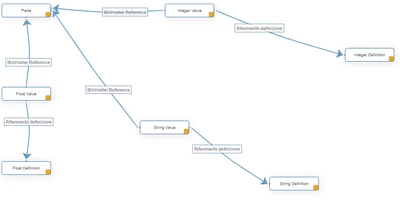
Best answer by Marco Tosin

Depending on the type of attribute defined (string, float, integer) you need to create a report like this but don't expect a row for each attribute if there are multiple values, because the total displayed is the multiplication of the possible values for each type of attribute in the report.


In my case it is 168 rows for each WTPart


Marco_Tosin_0-1715872185802.png


2 replies

12-Amethyst
May 16, 2024

GianpaoloGallo_0-1715870674665.png

Herein the list of attributes

Marco Tosin
21-Topaz I
21-Topaz I
May 16, 2024

Depending on the type of attribute defined (string, float, integer) you need to create a report like this but don't expect a row for each attribute if there are multiple values, because the total displayed is the multiplication of the possible values for each type of attribute in the report.


In my case it is 168 rows for each WTPart


Marco_Tosin_0-1715872185802.png


Marco
12-Amethyst
June 21, 2024

it's a pitty.

What I'm looking for is to create and send a report exactly as the attached search results.

BR

Gianpaolo

Immagine 2024-06-21 084710.png


Community Moderator
May 28, 2024

Hi @GianpaoloGallo


I wanted to follow up with you on your post to see if your question has been answered. 
If so, please mark the appropriate reply as the Accepted Solution. 
Of course, if you have more to share on your issue, please let the Community know so that we can continue to help you. 


Thanks,
Anurag