


avillanueva
23-Emerald I
23-Emerald I
December 13, 2023
Solved

Representations only accessible for WTDocs and CADDRAWINGS

  • December 13, 2023
  • 1 reply
  • 969 views

I have a bit of code that gets the representations of WTDocs and EPMDocuments. All was working well in Dev but in Test, I am seeing an odd behavior.  Thank you @Marco_Tosin for linking that article to the qml report on CAD Doc to Representations. I am using a call like this:


//Try to find and look in the default representation (most likely place)
Representation rep = RepresentationHelper.service.getDefaultRepresentation(doc);
if(rep != null) {
 returned = processRep(fileExt, rep, ch);
}


When I ran that report on my test server, only EPMDocuments that are CAD Drawings are showing up with representations when I know that all other EPMDocuments have representations as well. Stumped here.
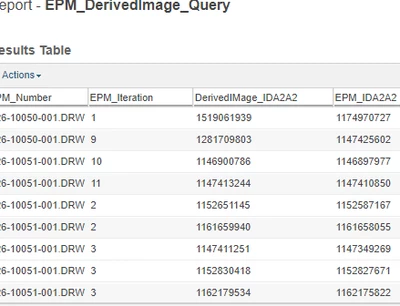
avillanueva_0-1702482374760.png

PS: Yes, representations for all items are functioning properly via UI and I can access them and see them in the interface. They do exist.

Best answer by avillanueva

I figured out my issue. The Dev server had EPMDocument with no WTPart associated. All the objects in my Prod/Test have WTParts associated. In the Derived Image table, the WTPart is the "Representable" and the EPMDocument its associated to is noted as "derived from". So I need to find another method or pass in the associated WTPart to the method above. Ugh. I verified that if you go to the Representations section of the UI for the CAD Doc and the WTPart, you are seeing the same Representations. 

1 reply

avillanueva
23-Emerald I
avillanueva23-Emerald IAuthorAnswer
23-Emerald I
December 13, 2023

I figured out my issue. The Dev server had EPMDocument with no WTPart associated. All the objects in my Prod/Test have WTParts associated. In the Derived Image table, the WTPart is the "Representable" and the EPMDocument its associated to is noted as "derived from". So I need to find another method or pass in the associated WTPart to the method above. Ugh. I verified that if you go to the Representations section of the UI for the CAD Doc and the WTPart, you are seeing the same Representations. 

HelesicPetr
22-Sapphire II
22-Sapphire II
December 14, 2023

Hi @avillanueva 


Yes, you find interesting behavior that I had not known for long time 😄 

If the CAD Document is linked "correctly" with a WTPart then the representation is really stored on WTPart. 

The "correctly" means if the build process has been done. (in DB there is column where that information is stored, if it is on EPM or WTP type)

Sometimes I could find a representation that should be stored on WTPart even though the owner link existed , because user just link the EPM with WTP by check-out/in function without build the WTPart attributes, BOM and so on.


PetrH