Hi Patrick,
I worked on C12755759 with Mike Genovese today and I think we may have figured out the problem in this case. The full MS log you provided for the case yielded some clues.
Your MS log shows the following:
2015-09-22 07:02:43,500 INFO [RMI TCP Connection(165)-10.80.96.61] wt.system.out - Getting container path= ''
2015-09-22 07:02:43,500 INFO [RMI TCP Connection(165)-10.80.96.61] wt.system.out - ERROR: Container path not set for this file, contact the author of the loadFile
2015-09-22 07:02:43,500 INFO [RMI TCP Connection(165)-10.80.96.61] wt.system.out - FIX THE LOAD FILE SET!
2015-09-22 07:02:43,500 INFO [RMI TCP Connection(165)-10.80.96.61] wt.system.out - Using the Windchill PDM container. If it doesn't exist will use the exchange instead.
2015-09-22 07:02:43,500 INFO [RMI TCP Connection(165)-10.80.96.61] wt.system.out - Could not find Windchill PDM container, using exchange instead
2015-09-22 07:02:43,501 INFO [RMI TCP Connection(165)-10.80.96.61] wt.system.out wcadmin - Using container with path= '/'
The lines in red indicate that the file is getting loaded into the Site level context. Since the Steelcase External group is an org-level group it can't find the group and is erroring out. You need to specify a CONT_PATH value pointing to the organization where the group exists in the LoadFromFile command.
We tested this out in-house with a group that is also defined in the AdministrativeLdap under the cn=Public... area and got similar results to what you were seeing when CONT_PATH was not specified. It worked if CONT_PATH pointed to the organization where the group existed:
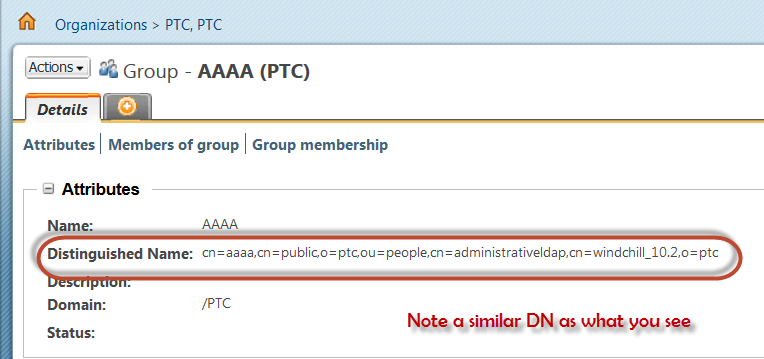
We used the following XML:
<?xml version="1.0" ?><!DOCTYPE NmLoader SYSTEM "standardX20.dtd">
<NmLoader>
<csvUserGroup handler="wt.load.LoadUser.createUserGroup" >
<csvuser></csvuser>
<csvgroupName>AAAA</csvgroupName>
<csvgroupNameDirectoryService></csvgroupNameDirectoryService>
<csvuserName>ptcuser</csvuserName>
<csvuserNameDirectoryService></csvuserNameDirectoryService>
<csvDirectoryService></csvDirectoryService>
</csvUserGroup>
</NmLoader>
Also tried this with the same result:
<?xml version="1.0" ?><!DOCTYPE NmLoader SYSTEM "standardX20.dtd">
<NmLoader>
<csvUserGroup handler="wt.load.LoadUser.createUserGroup" >
<csvuser></csvuser>
<csvgroupName>AAAA</csvgroupName>
<csvgroupNameDirectoryService>com.ptcts.Ldap</csvgroupNameDirectoryService>
<csvuserName>wcadmin</csvuserName>
<csvuserNameDirectoryService></csvuserNameDirectoryService>
<csvDirectoryService></csvDirectoryService>
</csvUserGroup>
</NmLoader>
We then used the following command to successfully load the file:
windchill wt.load.LoadFromFile -d Add_Group_Principals.xml -u wcadmin -p wcadmin -CONT_PATH \"/wt.inf.container.OrgContainer=PTC\"
I think if you update your loadFromFile command to specify the CONT_PATH to point to your organization then the load will be successful.

