
12-Amethyst
July 11, 2023
Solved

Unable to revise an Excel document with Windchill DTI

  • July 11, 2023
  • 5 replies
  • 5540 views

Hello Community,

We experienced something wrong with Windchill DTI :

A user revised an Excel document (.xlsm) to version B, and tried to open it with Excel, but nothing works : the file opened is still A.20 (the last iteration).


At first I suspected an issue with local files, but reproduced the problem with another account and computer with an empty cache.

We also tried to revise the document from Excel but it did not change anything : it was still version A in Excel, even if version B was created in Windchill.


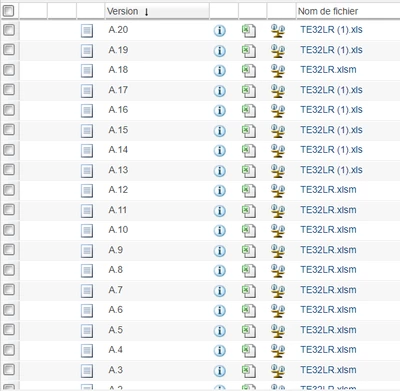
I don't know if this is in any way related to the problem but in file history one can see changes in the file name and extension, sometimes "*.xlsm" and then "* (1).xls"..... 
AdrienKLEIN_0-1689087390770.png

I don't have much more to give as informations, I hope this will be enough...


Any idea what can be the cause of such a weird behavior?


Thank you in advance!


Best answer by AdrienKLEIN

Hello everyone,

I finally managed to repair this file!!!

The problem was indeed due to the "(1)" and the extension ".xls" instead of ".xlsm".

Steps :

1. Open file from Windchill

2. Save as (in Excel) with the good name and good extension

3. Check in

4. Revise

5. Open again from Excel => Revision B.1 OK


I guess the original mistake came from the user but I still wonder how he was able to check in a file with a different name...

5 replies

avillanueva
23-Emerald I
23-Emerald I
July 11, 2023

When the system revises an object, the content remains the same. I think that is what you are seeing. Try checking out object (B rev) and then looking at object properties or details. What does it show?

avillanueva
23-Emerald I
23-Emerald I
July 11, 2023

Does the user have rights to revise? Have them try from web interface as well as DTI. Perhaps its just failing to revise.

12-Amethyst
July 12, 2023

Hello @avillanueva,

Thank you for your answers.

Revise is done in any case, and all users involved in this case have rights to revise, this is not policy related.

We already tried to check out what is opened, it does not work : even if a version B exists, it is still version A opened in Excel, even after performing "Update" command.

AdrienKLEIN_0-1689145417064.png

I don't understand at all what is the matter with this file....

HelesicPetr
22-Sapphire II
22-Sapphire II
July 12, 2023

Hi @AdrienKLEIN 

What is your Windchill version and Office version? 

There can be issue with office 365


PetrH

Marco Tosin
21-Topaz I
21-Topaz I
July 12, 2023
12-Amethyst
July 13, 2023

Thank you @Marco_Tosin but I don't understand why I should remove references, won't I lose the link between local file and server file?

Marco Tosin
21-Topaz I
21-Topaz I
July 13, 2023

The reason is explained in the second article I cited.


Years ago we encountered a problem similar to yours and solved it by removing the link to Windchill, written within the Office document attributes.


Once the link was removed, we were able to load the corrected version into the system, which recreated the link between the document and Windchill.


Marco
jbailey
18-Opal
July 12, 2023

Did you try opening the file directly in the office app (open excel, then browse to it)? Is the local location on onedrive ?


12-Amethyst
July 13, 2023

Hello @jbailey, thank you for your answer, it was always opened in office app, and local location isn't on onedrive.

jbailey
18-Opal
July 13, 2023

Try opening it directly from Office ... fyi .xlsm is a macro enabled excel file, xls/xlsx is a standard excel file.


AdrienKLEIN12-AmethystAuthorAnswer
12-Amethyst
November 3, 2023

Hello everyone,

I finally managed to repair this file!!!

The problem was indeed due to the "(1)" and the extension ".xls" instead of ".xlsm".

Steps :

1. Open file from Windchill

2. Save as (in Excel) with the good name and good extension

3. Check in

4. Revise

5. Open again from Excel => Revision B.1 OK


I guess the original mistake came from the user but I still wonder how he was able to check in a file with a different name...