

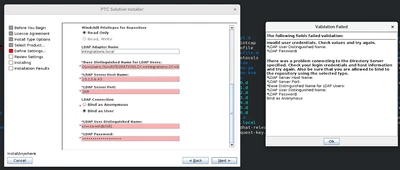
While entering the corporate LDAP Details in PSI is not accepting the values
Version: Windchill 12.1
Use Case: Corporate LDAP server details not accepted by the PSI. I am using WC 12.1.2.0
Description:
HI Expert.
I am installing WC 12.1.2.0 with corporate LDAP on Linux server (RHEL).
We are trying to enter the LDAP details of our corporate LDAP server but somehow PSI is not accepting the details and giving some error saying please check the username and password.
We have cross checked details with LDAP team, and they are saying username and other details are correct.
Can someone guide how we can connect to the Company LDAP? Are we missing nay configuration etc.
I have attached error below for reference.
Note-
I have installed OpenDJ but later on we decided to use the LDAP server of company which is integrated with AD.
I am stuck in initial installation step so no PSI logs were created yet.