
1-Visitor
April 4, 2017
Solved

working directory on startup?

  • April 4, 2017
  • 1 reply
  • 1493 views

Hello,

I would like to startup CP 3.0/4.0 and automatically be in a specific working directory drive instead of C:\Prostart (We currently do not use a PDM server). I can't find any setting in my config that drives the current location to C:\Prostart.

Does anyone know of a setting in config that will allow this?  Just FYI, I know that you can set it manually by right-clicking.

Thank you!
Best answer by TomU

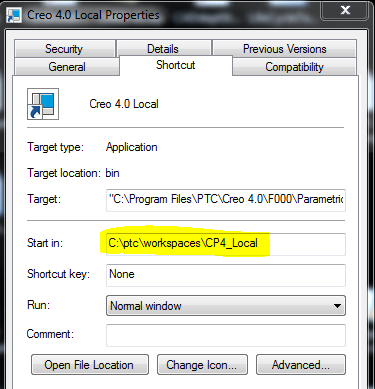
Your initial working directory is based on your start in location.  This can be controlled by the shortcut used to start or it can be manually set by a .bat file.

If you want to force Creo to always open files from a particular location, take a look at the config option file_open_default_folder.

1 reply

TomU23-Emerald IVAnswer
23-Emerald IV
April 4, 2017

Your initial working directory is based on your start in location.  This can be controlled by the shortcut used to start or it can be manually set by a .bat file.

If you want to force Creo to always open files from a particular location, take a look at the config option file_open_default_folder.