
16-Pearl
December 8, 2022
Solved

How to use alias attribut in drawing / part?

  • December 8, 2022
  • 4 replies
  • 3584 views

Hi there,


I want to display a "released by" information on my drawing.

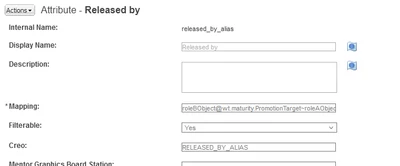
I created an alias attribute with this mapping:


roleBObject@wt.maturity.PromotionTarget~roleAObject^wt.maturity.PromotionNotice~primaryBusinessObject@wt.workflow.work.WorkItem~theWorkItemReference@wt.workflow.engine.WfVotingEventAudit~userRef^wt.org.WTPrincipal~name=name@wt.org.WTUser~fullName


The attribute works great so far and lists all User's Full Names, which were involved in the process.
Mat_0-1670510581637.png


The attribute should be shown as parameter "released_by_alias".

But in Creo no such parameter is listed.


What am I missing?
 

Best answer by TomU

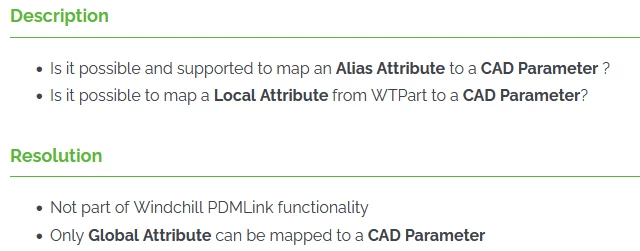
Adding to what @HelesicPetr wrote, see this from CS248702:


TomU_0-1671047006283.png


4 replies

joe_morton
18-Opal
18-Opal
December 12, 2022

I think you would need to add this as a new attribute in Creo, and probably make it part of your template files. You should also mark it as "designated".


HelesicPetr
22-Sapphire II
22-Sapphire II
December 14, 2022

Hi @Mat 

It does not work that way as you think.


Calculated attribute is not populated to the drawing/model in creo automatically. It is not IBA attribute.

The calculated attribute value is processed when it is shown on Windchill page.


So in the Windchill it works perfectly everyone can see it but if you need it inside of drawing, you need normal IBA attribute and designated attribute in the creo drawing. 


Also you need some code to propagate the value from workflow to the drawing without checkout/in. after that the drawing revisualization is needed . 


Hope this information can help you.


PetrH

PetrH
TomU23-Emerald IVAnswer
23-Emerald IV
December 14, 2022

Adding to what @HelesicPetr wrote, see this from CS248702:


TomU_0-1671047006283.png


Mat16-PearlAuthor
16-Pearl
December 15, 2022

@TomU  and @HelesicPetr , Thanks for Your answers.

@PTC: why, just why can't You provide this information like lifecycle state ( PTC_WM_LIFECYCLE_STATE ), Version  ( PTC_WM_VERSION ) or "modified by" ( PTC_WM_MODIFIED_BY )?


To me, it is another basic feature missing in this overpriced software suite.

But thanks god, that there is now an IOT interface.

HelesicPetr
22-Sapphire II
22-Sapphire II
December 15, 2022

@Mat 

Because workaround exists and nice to have ideas are not enough interesting for business. 


You can use java code to populate attribute values as you need from workflow,

or there is an another way to use com.ptc.windchill.uwgm.proesrv.c11n.DefaultModeledAttributesDelegate


More info you can find in Windchill Customization Guide: section Customizing the Parameters in the Download Service  cs18803


PetrH 

PetrH
Mat16-PearlAuthor
16-Pearl
December 17, 2024

I was able to get a working solution for my problem, which I had at the first place ( displaying "approved by" on a drawing).


I posted my solution here:

https://community.ptc.com/t5/Windchill-Customization/Info-How-to-set-attribute-for-quot-released-by-quot-quot/m-p/988177