
13-Aquamarine
January 10, 2024
Solved

How to implement Json with step instructions from sequence for label in Vuforia studio ?

  • January 10, 2024
  • 1 reply
  • 3537 views

Hello Dear Community, Happy New Year

Please advise how I can implement a Jason file from the Creo Illustrate sequence annotation description for the step instructions in label in Vuforia Studio? 

Thank you
Best answer by RolandRaytchev

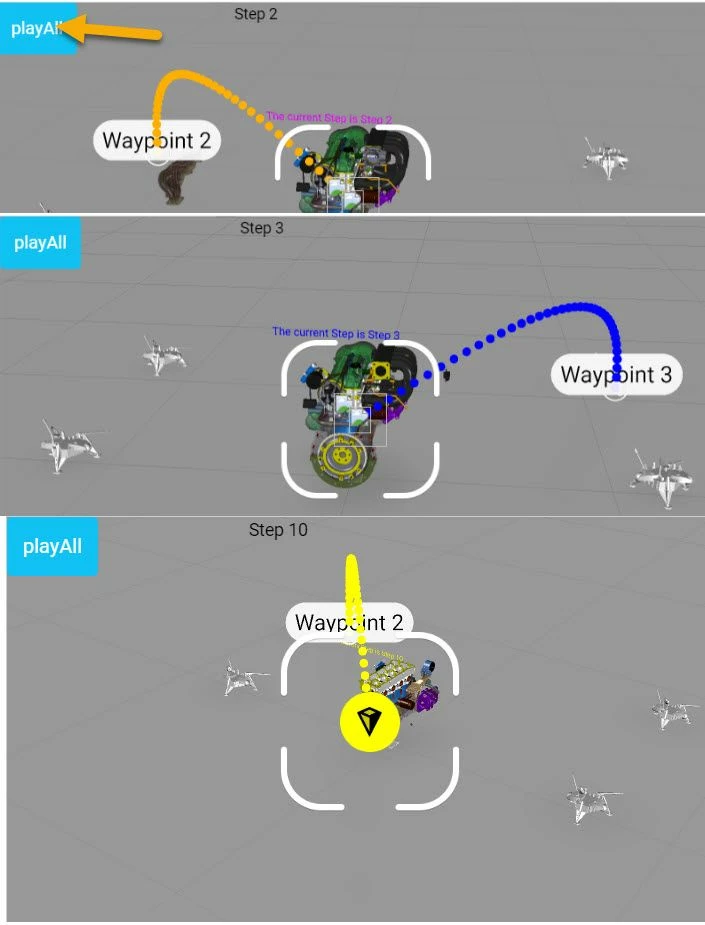
for the one specific approach here  I want  to provide a simple example.

  1. a project will start manually the playAll service ,by clicking on button which has binding to the playAll service of the modelwidget.
  2. for each step number is called a json file called here properties_step_XX.json. This contains widget and properties which should be set when the step started. 
  3. Syntax of the json file could be something like this  :
    {
    "label-1":{"text":"Step 7"},
    "3DLabel-1":{"visible":true,"text":"The current Step is Step 7","fontColor":"#ff6347"},
    "wayfinder-1":{"selectedWaypointIndex":7,"ribbonColor":"#ff6347"}
    } ​


  4. I used some code as shown in the picture of the previous post  

    $scope.jsonData={}; //global $scope variable
    //===========================================================================
    gotJSON=function(data){
     try{
    $scope.jsonData=JSON.parse(data);
     console.warn( JSON.stringify($scope.jsonData))
     $scope.setMutipleProps($scope.jsonData)
     } 
    catch(wrong){ console.warn(wrong);}
    
    }
    //===========================================================================
    doRead=function (jsonFile){
    fetch(jsonFile)
     .then(response=>response.text())
     .then(data=>gotJSON(data))
    }
    
    //===========================================================================
    $scope.readDataForStepNumber=function(stepNumber) {
    let jsonFile= "app/resources/Uploaded/properties_step_"+stepNumber+".json"
    console.log("jsonFile=",jsonFile)
    doRead(jsonFile)
    }
    //============================================
    function toHex(str) { var ret = ''; 
     for (var i=0; i<str.length; i++) { ret += str.charCodeAt(i).toString(16);}return ret;}
    //===========================================================================
    //the code will read the complette JSON File and
    //assignee it to a jsonData global variable
    //func will set mutliple widget properties according JSON
    $scope.setMutipleProps = function(obj){
     Object.keys(obj).forEach(function (item) {
     for(var prop in obj[item]) {
     if((item.toString().indexOf('wayfinder') !=-1) && ( prop.toString().indexOf('selectedWaypointIndex') !=-1)) // will set the index one of 4
     { $scope.view.wdg[item][prop]= (parseInt(obj[item][prop])-1)%4; } 
     else
     $scope.view.wdg[item][prop]=obj[item][prop]; 
     $scope.$applyAsync()
     //print the setting for debugging 
    							console.log("==>$scope.view.wdg["+item+"]["+prop+"]="+$scope.view.wdg[item][prop] )
     } 
     							})
     };
    //===========================================================================
    //$scope.$on('stepcompleted', function(evt, arg1, arg2, arg3) { //not used
     $scope.$on('stepstarted', function(evt, arg1, arg2, arg3) { 
     var parsedArg3 = JSON.parse(arg3);
     
     $scope.readDataForStepNumber(parsedArg3.stepNumber)
     $scope.$applyAsync()
     }); 
    //===============


  5. Tested in Vuforia Studio preview mode - so it set some properties for testing e.g.
  6. 2024-01-12_17-03-13.jpg
  7. demo project attached


1 reply

21-Topaz I
January 11, 2024

Hello @IB_10645210 ,

what is the goal here? You mention a json file? What is the reason to require a json fil? e.g. You need to save it back to Thingworx repository etc.?

So far I understand you want to have access to the step parameter? 

During a step playing you can access this paramter e.g. in the stepstarted or stepcompleted event ... e.g.

//==================================
$scope.$on('stepstarted', function(evt, arg1, arg2, arg3) { 
 var parsedArg3 = JSON.parse(arg3);

 console.log("stepName="+parsedArg3.stepName);
 console.log("stepDescription="+parsedArg3.stepDescription);
 console.log("nextStep="+parsedArg3.nextStep);
 
 $scope.stepDescription=parsedArg3.stepDescription;
 console.warn("Event: " + evt.name + " arg3 fields, name: " + parsedArg3.stepName + " duration(ms): " + parsedArg3.duration + " total steps: " + parsedArg3.totalSteps + " step desc: " + parsedArg3.stepDescription );
}); 

in the javascript info is printed to console and saved to $scope parameter. Similar to the example the info could be also added to a json object. We can save this json object later to json File in Thingworx file repostitory. A local save in project directory so far I know is not allowed because of security reasons.

I am not sure if the step descripton is in the metadata - I belive not because is this informaiton possibly in the PVI file , information related to the sequence. Possibly we can read the sequence pvi file and extract the step description infromation. Need to check this further. Thanks

21-Topaz I
January 11, 2024

In the sequence pvi ( file we can find the step_description informaiton

...
...
<galaxy_3di:sequence_step>
 <galaxy_3di:property
 type="string"
 name="step_name_locid"
 value="stepName_9490964569646394174_0"/>
 <galaxy_3di:property
 type="string"
 name="step_name"
 value="Step 1"/>
 <galaxy_3di:property
 type="bool"
 name="step_acknowledge">false</galaxy_3di:property>
 <galaxy_3di:property
 type="string"
 name="step_description_locid"
 value="stepDescription_9167703768846522178_0"/>
 <galaxy_3di:property
 type="string"
 name="step_description"
 value="NOTE FOR STEP1"/>
....
....

so using some xml parser (DOMParser )we could find and extract the step_description informaiton.

the sequence.pvi file is inside the pvz model file. It could be unziped  as file. The pvi file has the same name as the figrure/sequence what we can see in Studio in the sequence property for the modelWidget.  (I-Creo 3D - +<figure name>)

13-Aquamarine
January 11, 2024

@RolandRaytchev Thank you for response!

I want to simplify my experience in Vuforia Studio.

My current each JS page on VS has 400 lines ( for each case with instruction + "if", "else" for a few  popup dialogs + Wayfinder for some cases) . As I recently learned I can save time on implementing instructions with label and load json file with instructions from Sequence's annotations. Also I can load sequence list from pvi to the dropdown list which is also will save me some time. Please advise  how I can accomplish this.