Here's a couple solutions. For your solution to parse the number from that full value use the Sub String function.
Sub String | This string function returns the portion of string expression specified by the start and length numeric expressions. | Takes a string expression as the first parameter, a start numeric expression as the second parameter, and a length numeric expression as the third parameter. | SUB_STRING | SUBSTR | SUBSTRING | Sub String('Windchill', 3, 2) returns 'nd' |
Sub String (Business Obj Reference 1, 18, 10) will return '6117884855'. This works because the prefix before the number is always the same and 18 characters long and the number itself will always be 10 characters long. So basically this parses the full value by starting at the 18th character and returning only next 10 characters. So in the actual query builder set up for the function plug in the reportable column 'Business Obj Reference 1' as the first argument, then the number constant 18 as the second argument, then the number constant 10 as the third argument.
Now - to properly use the data model to do this reference the following CS article: https://www.ptc.com/en/support/article/CS153902
Specifically this section I've circled. It translates to the table & join setup below. What you'll notice is that the link between the Workflow Process and Control Branch is further explained in the post it note. The businessObjReference value from the Workflow Process is "stored" in the Control Branch table's ID2A2 column, which equates to the Persist Info.Object Identifier.Id in query builder tables, however, in the Control Branch table it doesn't include the type prefix. In your case 'VR:wt.part.WTPart:'. And if you try to make a join between them you'll see there is no 'businessObjReference' join type you can use.
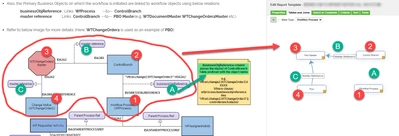
To get around this I simply put in a criteria that says the Control Branch OID, plus the type prefix, must equal the 'Business Obj Reference 1' column value from the workflow process.
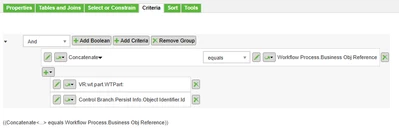
When you run this report then it pull the part data no problem. It does return duplicate rows (one for the part result and one for the Workflow Process result so I'd say you have to tick the box for "Distinct" on the report properties page. I hadn't figured out a way to have it return only one row without using Distinct, but hey close enough for free help I'd say. I did try setting the Part Latest Iteration = True/Yes/1 but that didn't affect it. I think it really is just because you're returning results from two different tables that don't actually have a Join between them.



