
4-Participant
February 12, 2026
Question

Troubleshooting LDAP Error 19 (CONSTRAINT_ATT_TYPE) When Creating Users in Windchill 13

  • February 12, 2026
  • 1 reply
  • 135 views

Version: Windchill 13.1


Use Case: Hi everyone, I am currently working on a Windchill 13.0 environment integrated with Active Directory (ADS). Previously, the "Add New Participant" button was missing, which I have successfully resolved by setting the JNDI Adapter to ReadOnly=false. However, I am now encountering a persistent error when attempting to create a new user directly from the Windchill Participant Administration. Current Error Message:[LDAP: error code 19 - 00002081: AtrErr: DSID-03151F00, #1: 0: 00002081: DSID-03151F00, problem 1005 (CONSTRAINT_ATT_TYPE), data 0, Att 3 (cn)]. Configuration Details: Windchill Version: 13.0 Directory Type: Active Directory (ADS) Adapter Mapping: mapping.user.uniqueIdAttribute = cn (previously tried sAMAccountName but got Error 64) mapping.user.uid = sAMAccountName mapping.user.cn = cn Troubleshooting Steps Taken: Verified that the JNDI manager account has sufficient "Write" permissions in the target OU. Ensured that mandatory attributes like Surname (sn) and Full Name are populated in the "New User" wizard. Attempted using complex passwords to satisfy Domain Password Policies. Despite these, AD still returns Error 19 on the cn attribute. I am considering changing uniqueIdAttribute to objectGUID to see if it stabilizes the connection. Has anyone encountered this specific constraint violation on the cn attribute when using AD? Are there any specific Additional Properties or mapping adjustments required for Windchill 13 to successfully "Write" new user objects to Active Directory? Any insights or recommended mapping snippets would be greatly appreciated.


Description:
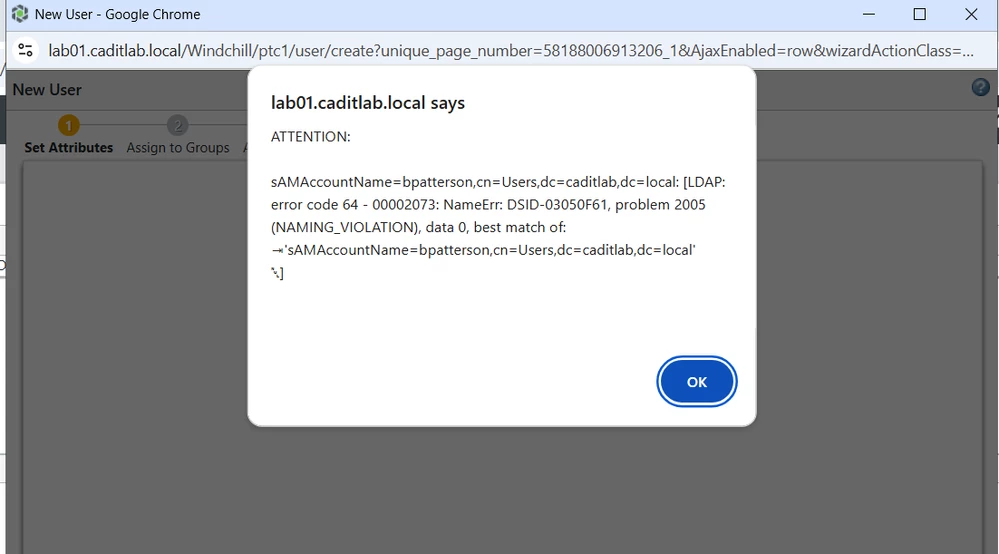
image (12).png

1 reply

16-Pearl
February 12, 2026

Could you share a bit more background on what you’re trying to accomplish?
For example, is this part of a learning exercise, an upgrade, a domain migration, or something else?

The error message indicates that the account you’re attempting to create already exists in LDAP, so the directory is rejecting the request to avoid a duplicate.

Since this appears to be a lab environment, it might be worth noting how this is usually handled in customer production setups. In the customer deployments I’ve worked with, organizations do not allow PTC Windchill to create or modify objects in Active Directory.

Instead, the AD administrators manage the user accounts in the corporate directory, and those accounts are then made available to Windchill via LDAP security groups (a.k.a. 'filter groups'). Windchill simply searches for them, and once they are visible, they can be used for access and licensing.

Regarding uniqueness: Windchill relies on unique LDAP attributes like sAMAccountName or userPrincipalName as stable identifiers.
The CN value is mainly part of the distinguished name and is not guaranteed to be unique, so it’s generally not a safe choice for identity matching or provisioning logic.

4-Participant
February 12, 2026

Thank you for your response! 

I’m setting up a Windchill environment for a product demonstration, following the example shown in the guidebook provider by PTC.

Based on the guide, we should be able to add users directly by clicking “Create New User” within a specific context (for example, inside an Organization). However, in my case, Windchill returns an error indicating that the account already exists in LDAP.

My goal is to have a demo-ready environment where I can quickly create and manage test users inside Windchill, similar to what is shown in the guide.

avillanueva
23-Emerald I
23-Emerald I
February 12, 2026

Like @mmeadows-3 indicated, if you have connected Windchill to use Active Directory as your LDAP, the user account probably already exists. It is therefore read only. The guide might be showing a case if you are using a dedicated LDAP like OpenDJ where Windchill would have read/write control and create user would work. If you are connected directly to AD, I "believe" that a user record in Windchill would be created on first login of that user (right?) or if you looked them up in the Participant Administrator and assigned a license to them. I do not have this setup so others might correct me.