

7-Bedrock
April 12, 2025
Solved

Can we add GUI components to an attribute panel using Builders?

  • April 12, 2025
  • 1 reply
  • 1029 views

Hello Everyone,

Is it possible to add GUI components like Textbox, Checkbox, Radio Button, Combo Box, and Text Area into an attribute panel using Builders?


I was able to achieve this using wrapper tags in JSP.

 
@Override
public ComponentConfig buildComponentConfig(ComponentParams param) throws WTException {

	ComponentConfigFactory componentConfigFactory = getComponentConfigFactory();

	AttributePanelConfig attributePanelConfig = componentConfigFactory.newAttributePanelConfig();
	GroupConfig groupConfig = componentConfigFactory.newGroupConfig("GUI Componenets");
	
	groupConfig.addComponent((ComponentConfig)componentConfigFactory.newAttributeConfig("date", "Date"));
	groupConfig.addComponent((ComponentConfig)componentConfigFactory.newAttributeConfig("textBox", "TextBox"));
	groupConfig.addComponent((ComponentConfig)componentConfigFactory.newAttributeConfig("comboBox", "ComboBox"));
 groupConfig.addComponent((ComponentConfig)componentConfigFactory.newAttributeConfig("radioButton", "Radio Button"));
 groupConfig.addComponent((ComponentConfig)componentConfigFactory.newAttributeConfig("checkbox", "Checkbox"));

 attributePanelConfig.addComponent(groupConfig);
 
	return attributePanelConfig;
}
 

Best answer by Ponnarasu

Hi @HelesicPetr 

Thank you for the suggestion.

I can able to create GUI component in Builders

  • By importing below packages
import com.ptc.core.components.rendering.AbstractGuiComponent;
import com.ptc.core.components.rendering.guicomponents.ComboBox;
import com.ptc.core.components.rendering.guicomponents.TextArea;
import com.ptc.core.components.rendering.guicomponents.TextBox;
  •  By using below code
@Override
public Object buildComponentData(ComponentConfig config, ComponentParams param) throws WTException {

	TextBox textbox = new TextBox();
	textbox.setName("textBox");
	textbox.setId("textBox");
	textbox.setEditable(true);
	textbox.setWidth(50);

	ArrayList<String> displayList = new ArrayList<String>();
	ArrayList<String> internalNameList = new ArrayList<String>();
	ArrayList<String> selectedValue = new ArrayList<String>();
	displayList.add("Option 1");
	displayList.add("Option 2");
	displayList.add("Option 3");
	internalNameList.add("option1");
	internalNameList.add("option2");
	internalNameList.add("option3");

	ComboBox comboBox = new ComboBox(displayList, internalNameList, selectedValue);
	comboBox.setName("comboBox");
	comboBox.setId("comboBox");
	comboBox.setMultiSelect(false);

	TextArea textArea = new TextArea();
	textArea.setName("textArea");
	textArea.setId("textArea");
	textArea.setEditable(true);

	Map<String, AbstractGuiComponent> guiMap = new HashMap<String, AbstractGuiComponent>();
	guiMap.put("textBox", textbox);
	guiMap.put("comboBox", comboBox);
	guiMap.put("textArea", textArea);

	return guiMap;
}


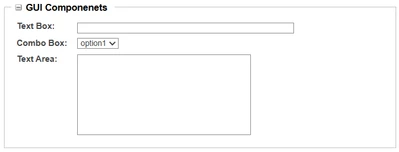
Output

Ponnarasu_0-1744794793097.png


1 reply

HelesicPetr
22-Sapphire II
22-Sapphire II
April 15, 2025

Hi @Ponnarasu 

It seams that you solve your question. So what is your trouble?

PetrH

Ponnarasu7-BedrockAuthor
7-Bedrock
April 15, 2025

Hello @HelesicPetr 

I can achieve my requirement using JSP, but I want to know if the same can be done using Builder.


Please find the buildComponentConfig code below.


	@Override
	public ComponentConfig buildComponentConfig(ComponentParams param) throws WTException {

		ComponentConfigFactory componentConfigFactory = getComponentConfigFactory();

		AttributePanelConfig attributePanelConfig = componentConfigFactory.newAttributePanelConfig();
		
		GroupConfig groupConfig1 = componentConfigFactory.newGroupConfig("gui","GUI Componenets",Integer.valueOf(1));
		
		groupConfig1.addComponent((ComponentConfig)componentConfigFactory.newAttributeConfig("date", "Date"));
		groupConfig1.addComponent((ComponentConfig)componentConfigFactory.newAttributeConfig("textBox", "TextBox"));
		groupConfig1.addComponent((ComponentConfig)componentConfigFactory.newAttributeConfig("comboBox", "ComboBox"));
	 groupConfig1.addComponent((ComponentConfig)componentConfigFactory.newAttributeConfig("radioButton", "Radio Button"));
	 groupConfig1.addComponent((ComponentConfig)componentConfigFactory.newAttributeConfig("checkbox", "Checkbox"));

	 attributePanelConfig.addComponent(groupConfig1);
	 
	 GroupConfig groupConfig2 = componentConfigFactory.newGroupConfig("epm", "EPM Attribute", Integer.valueOf(2));
	 groupConfig2.addComponent((ComponentConfig)componentConfigFactory.newAttributeConfig("name", "Name"));
	 groupConfig2.addComponent((ComponentConfig)componentConfigFactory.newAttributeConfig("number", "Number"));
	 
	 attributePanelConfig.addComponent(groupConfig2);
	 
		return attributePanelConfig;
	} 


I'm getting output like below screenshot

Ponnarasu_0-1744720847756.png

Can we get the GUI component like

Ponnarasu_1-1744721077685.png


HelesicPetr
22-Sapphire II
22-Sapphire II
April 15, 2025

Hi @Ponnarasu 

You have to set the component editable.

I do it in a datautility

checkBox.setEditable(true);
textArea.setEditable(true);

PetrH