
"You fargin' ....!" I will skip the swearing but if you get the reference, you know where I am at. Well, this has been a frustrating adventure but I would I would summarize what I found so that you do not need to go dumpster diving again. TL/DR - If PTC does not want to enhance workflow task emails, update your docs to indicate the limits of configuration possible so that customers do not bang their heads against the wall.
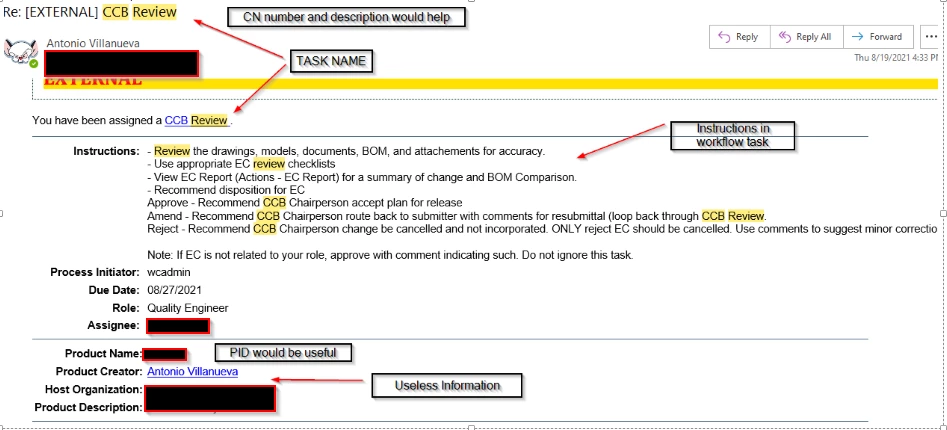
Let's start with the basics. Below is an OOTB user task email message. I am not going to discuss notification emails which are more configurable, just ones delivered from user assignment tasks.
Here is a list of help docs, articles and other posting I found on topic.
https://www.ptc.com/en/support/article/CS184118?language=en&posno=3&q=custom%20email%20templates%20workflows&source=search
Indicates ability to include variables in instructions. PBO would appear as a hyper link.
This would be a low code approach.
https://www.ptc.com/en/support/article/CS151717
This works to change the subject or task name at start of assignment. This could make sorting tasks in tables difficult relying on prefixing.
https://community.ptc.com/t5/Windchill/Workflow-Task-Notifcation-Questions/m-p/581897#M58417%3F&art_lang=en&posno=2&q=getProcessVariable&ProductFamily=Windchill&source=search
Motherload of information: Kudos to @TomU !!!!
https://www.ptc.com/en/support/article/CS94124?language=en&posno=1&q=beginSubject&source=search
This indicates that the supported method is possible in templates without coding. Changing the subject!!
Here is what I learned from turning on logging and Eclipse:
- The createNotification methods that build the email are locked up in WfAssignment for user task emails. This is a core class so next to impossible to extend and replace. In addition, they have hardcoded the General html template and the template processor (WfTaskNotificationProcessor) so we are locked into what they can provide. @TomU has documented what's available.
- The WfTaskNotificationProcessor wraps around WfTaskProcessor internally but does not extend so its methods are not inherited or exposed. Bummer. Since we only have what the template processor provides, I found addText, process and activity variables, and the PBO name useful. Overall, this is the biggest bunch of spaghetti coding I've seen. With all the enhancement requests on this topic, why this was not fixed is beyond me? All they had to do was add a few more useful methods. Disappointing.
- The body of the email from "You've been assigned... to Product Description" is all from one method call: activityAttributes(). This means you cannot change its structure or remove information. Again, the number of hops this code takes is astounding.
- @dmcalister-2 and @gobada so point to a method of changing via transition code, the task name which will influence the email subject (CS151717). This does work but also can make sorting, grouping and filtering of tasks a mess in Windchill since they would all be changing. A better solution was presented in CS94124. Again, we are limited to methods available to us in WfTaskNotificationProcessor. Not even the PBO number is available.
- Email subject: This block added above <head> in the General template will change the email subject BUT this template is used for ALL workflow user task emails. It is fault tolerate so if value does not exist, nothing is displayed but JHC guys, this is like 110M hurdles here. If want anything useful, you'll need to create a process variable in ALL your workflows that contains the text you want to show in email. This means that CR, CN, Problem Reports, Promotion Notices, Change task, all need to have the same variable. You can populate it with whatever you want.
<SCRIPT LANGUAGE=Windchill> <!-- beginSubject --> </SCRIPT>
<SCRIPT LANGUAGE=Windchill> <!-- getActivityName --> </SCRIPT>
<SCRIPT LANGUAGE=Windchill> <!-- addText text=" - " --> </SCRIPT>
<SCRIPT LANGUAGE=Windchill> <!-- getProcessVariable varName="pboNumber" --> </SCRIPT>
<SCRIPT LANGUAGE=Windchill> <!-- addText text=" - " --> </SCRIPT>
<SCRIPT LANGUAGE=Windchill> <!-- getPrimaryBusinessObjectName --> </SCRIPT>
<SCRIPT LANGUAGE=Windchill> <!-- endSubject --> </SCRIPT>
<head>

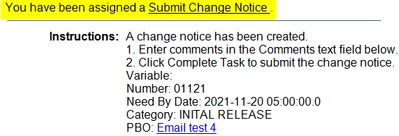
- The only thing that is left is the body and the ONLY place I found that is place to stick stuff is the instructions. See CS184118. This can be task specific so you have to pass all your variables to the task and update instructions to call them out. It does work and opens up possibilities to gather related data into the email. Just a PITA to get this far.
Still here? Thanks for reading. I do know of some other tricks here but I would not recommend. One is turning off send notification flag in task and generating your own email (which you would have control over the template) but that is overkill here. PTC really needs to ditch template processors OR provide users with the flexibility to alter as it was designed to do. Simply make a look up to a properties file where we can change the HTML template and processor if we like. Bare minimum would be document what users and tech support have compiled. Best would be to include those enhancements. Remember, this is what the casual user sees as their first introduction to Windchill. <end of rant>


