
"BEND IT LIKE CREO" (SHEETMETAL) CREO CHALLENGE #8
I love learning which is probably why I teach classes. I first learned the basics of sheet metal as a kid racing motorcycles with my dad. Whenever we crashed and something broke on the bike, the challenge was to quickly fabricate a new sheet metal bracket or mount to place properly whatever had bent. We had to be back on track for the next heat race. At the motocross track, resources are limited. Often with only a vise and an adjustable wrench maybe a grinder and a vice we are making brackets & bending other brackets to accommodate mangled geometry. My dad took the time to explain the basics sheet metal so sheet metal is personal for me. Stretch, flat patterns, grain direction & Aluminum cracks where steel bends without tearing, Everything in racing is a learning opportunity. Those early lessons taught me the value of resourcefulness, problem-solving and understanding the fundamentals of sheet metal which leads me to this challenge.
Today, as designers and engineers working in Creo, we have access to fabrications centers, job shops and in-house brake press machines. If you've not used the Creo Sheetmetal module before now is your chance. It's available in every Creo license so there's no problem with licensing or access. Also, I plan to offer a sheet metal lunch and learn to get you started. Sept 3rd. These photos/screen grabs below are from my 25+ years of teaching Creo Sheetmetal classes at Design Engine.
Bend It Like in Creo – The Sheet Metal Edition
Are you ready to bend your modeling break press muscles? This month, we’re diving into the Sheet metal mode in Creo. One of the most powerful (and fun!) tools you already have access to with your standard license.
We’re providing you with a set of 4 Photos/Screen grabs for the Sheet metal parts to recreate in Creo. Each one presents a unique modeling scenario, from basic wall and bend creation to more advanced reliefs and flattening challenges. As we leverage parent child relationships, size is not explicitly important because the Creo geometry can be so flexible. If you would like a step file of any of the geometries just ask.
Your mission:
- Rebuild each part in Creo using the Sheet metal mode. * Maybe there are other techniques that one can use that would stimulate discussions.
- Ensure each part can flatten without errors
- Apply thoughtful design intent and parametric structure for ease of modifying parametrically.
- Ensure the extreme flexibility / modifiability Creo is known for.
- Describe your thought process
How to Participate:
- Model each part in your version of Creo using the limited screen grab or image below.
- Share:
- Upload your .prt files Zipped. Name it appropriately so we know what version of Creo you used. cowling900.prt for Creo 9.0 makes sense.
- Screenshots of the model and flat pattern.
- Describe using notes about your thoughts, approach or tips you discovered.
No judging. No pressure. Its fun and a great way to practice, learn, and share with fellow Creo users.
Why Join?
- Sharpen your Sheetmetal skills.
- Get inspired by how others model the same part.
- Be part of a collaborative, creative learning experience.
- Learn something new.
- Get us all thinking and promote intelligent discussions.
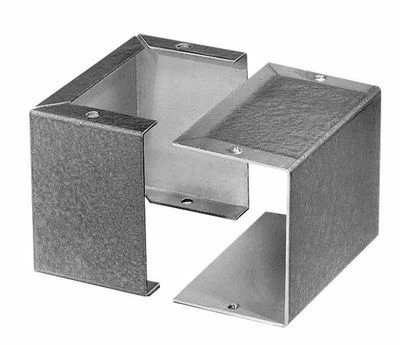
1. Simple Sheet Metal Parts fitting together within an assembly *Sheet Metal Enclosure
Features: A single flange with a few holes and simple reliefs. Ends in a clean flat pattern.
A great starter part for beginners: focus on flanges, corner relief, bend, and flat tools in Creo Parametric.
The flat pattern view verifies it regenerates and flattens perfectly. A secondary challenge for this assembly might be to ensure the parts always puzzle together. Change one Skel part and the piece parts update. For example I might use top down design skeleton part to drive the two geometries.
2. Intermediate Part *Spare Tire Mount
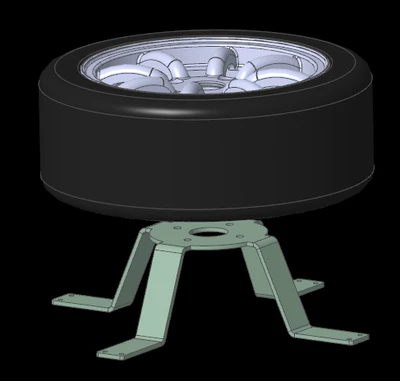
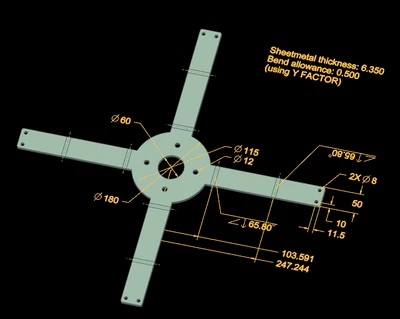
Features: Multiple bends, unbend/bend operations, holes in patterns, notches. At the end, the model is flattened. Include drawing annotations showing material thickness and bend allowance, essential for manufacturability. This level demonstrates real-world practices: planned bends, hole patterns, and overall intent. The pattern on this part may be more challenging that at first understood.
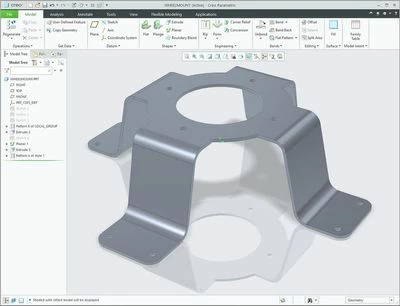
3. Complex Housing Assembly (Single Sheetmetal Part) *Aluminum Rear Seat Support Cowling
Features: More walls, cutouts, tabs, notches, perhaps light louvers or stiffeners. Shows the full power of Creo’s Sheetmetal flattening. This type of part highlights how Creo handles intricate bends, and flattening over complex geometry without errors. There are a number of methods for approaching all geometries including this one.
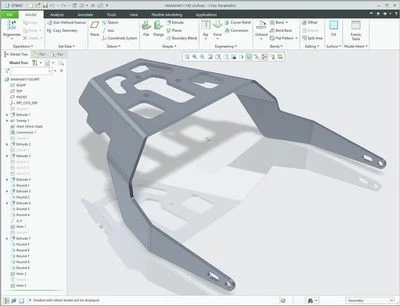
4. Extra Credit: Multibody Sheetmetal with Flat Assembly Export *Desk Lamp
Showcases Creo 11+ multibody Sheetmetal capability: multiple bodies in one part file. One might apply Boolean, split, or trim operations between bodies, create independent flat states, and manage everything via the Flat Pattern Manager. Great for advanced users: assemble layered components or hybrid configurations, then generate individual or assembly-level flat patterns using the multibody workflow. One challenge is to have the geometry flexible for changes in front of marketing & have the sheet metal part be laid out with one sheet metal part. Another challenge may be to establish the flattened state onto a sheet so not to be wasteful of metal scrap.

5. Extra Credit: Multibody Sheetmetal *Guard Rail
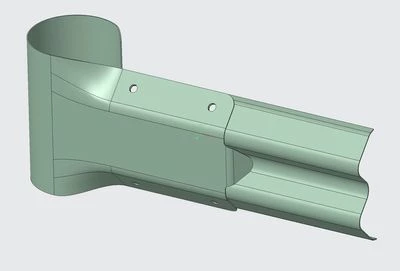
Showcases Creo 12+ This particular guard rail design helps slow a moving vehicle with the crutch factor. Consider using Mulitibody can be helpful to maintain proper hole alignment with the two parts. There are other challenges in this assembly that you will notice as you try to create the geometry.
Bart Brejcha bart@designengine.com