1-Visitor
December 7, 2013
Solved

Creo 2 Parametric Syscol.scl file options

  • December 7, 2013
  • 2 replies
  • 9100 views

Does anyone have a listing of options that can be put in the syscol.scl color file? we are moving from WF4 to Creo 2.


One of the technicians at PTC stated that their isn't any documentation.


Thanks in advance,

Lance Lie


This thread is inactive and closed by the PTC Community Management Team. If you would like to provide a reply and re-open this thread, please notify the moderator and reference the thread. You may also use "Start a topic" button to ask a new question. Please be sure to include what version of the PTC product you are using so another community member knowledgeable about your version may be able to assist.
Best answer by TomD.inPDX

There is a caveat to that, Reinhard. If this occurs on the surface of the part being cut, yes it will fail, but if it is beyond the surface it works. So yes, it can intersect itself except under certain circumstances. I know there is a lot more to it than I can explain, but for the most part, the failure is tangency and accuracy rather than a simple rule.

bolt_thread_II.PNG

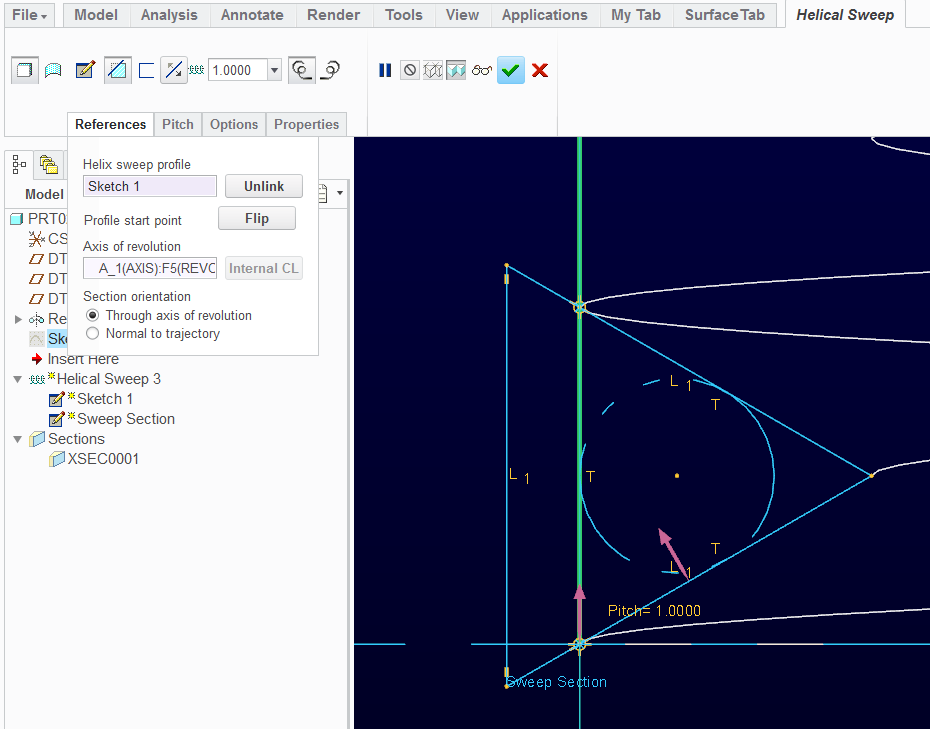
When the edges are very close to tangent, you will fail on accuracy; when the sweep tries to share the centerline, it will likely fail; there is a difference between Section orientation - Through axis of revolution|Normal to trajectory as well. <<== this one gets many people when defining a Helical Sweeps... In springs, for instance, the wire needs to remain round and the orientation should be set to Normal to Trajectory.

In general, it is a bit of extra work to get a successful helical sweep if you want a textbook theoretical thread. Once we get around this, they seem to rarely fail; or at least, we know what to do about it in short order. But one thing I won't except is to have the software tell me what I can't do. One way or the other, I do get exactly what I want.

This will work for the original question where the sweep sketch is on the edge of the cylinder, and the equilateral triangle is normal to the revolve axis... It also controls the thread width the same as the pitch.

bolt_thread_III.PNG

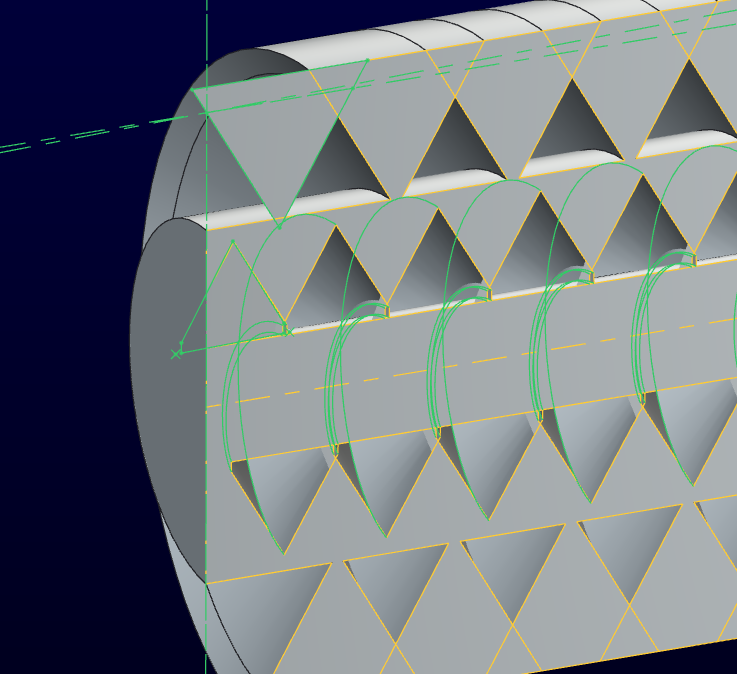
bolt_thread_IV.PNG

2 replies

17-Peridot
December 7, 2013

You are working with a very small bolt. It could be in the accuracy settings. Try changing the pitch to a larger value and see if that lets it work.

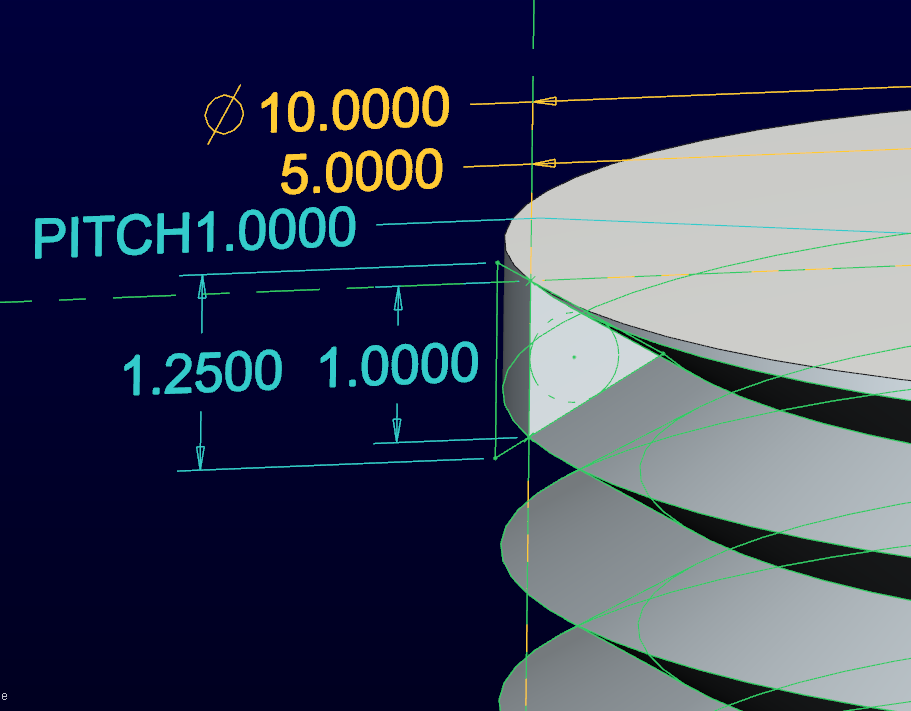
In general, these work as expected but sometimes it gets lost. Is the value of L1 the same as the pitch? This can cause issues and can be resolved by stepping the triangle outside the bolt face and increasing L1 but manage the ID of the cut. This will create an overlap in the spiral but will eliminate the tangency issues.

The trajectory is simply a guide. The axis is a key element. Just know how your sketch will interact with the trajectory.

When I define a bolt like this, I try to leave the appropriate flats. Making the widths of the flat the same inside and outside is the challenge. The theoretical sharp of the thread is always slightly larger than the specified screw size. Below, the pitch is also .8:

bolt_thread.PNG

1-Visitor
December 8, 2013

Where's the challenge?

Sketch a construction line that is at the top crest and bottom crest location and another that is just below (oriented per your diagram) the bottom crest location. These construction lines will be constrained to points on the OD so that the geometry lines can extend beyond the body of the screw.

The distance from the last construction line and the upper one is the pitch. Set the distance between the last construction line and the bottom crest location to be the same as the minor diameter flat and they are automatically equal. This will replace the 0.8 dimension.

Cutting screw threads in models is an interesting exercise, but they are computationally expensive and provide little feedback for design purposes. For example, they don't well record the minimum and maximum threaded lengths, which a pair of datum curve circles can do. Threaded length range is useful to display that there is enough thread engagement.

I really wish PTC would make use of solid surface characteristics, such that one could apply a thread pitch and minor diameter and, when assembling, one could get feedback that the mating surface matched, and ignore interference between the major diameter solid surface of a screw and the minor diameter solid surface of the mating nut while not ignoring clearance problems with non-threaded surfaces. We're only 13.9% into the 21st Century and meaningful checks that don't produce a bazillion false positives are a lot to ask for. Yes, I know about cosmetic threads, and they don't offer this ability, and aren't particularly cosmetic, tending to show through solid features needlessly.

17-Peridot
December 8, 2013

(the sketch already constrains equal flat areas with the two equal diameter reference circles. I use the ID from the provided cosmetic thread to determine the offset)

Although it has always been PTC's stance that threads need not be modeled, they work really nice when grown using a quality 3D prototyping system when you don't have the particular tap on hand. They also help in some instances where you want realistic images or diagrams where you want to distinguish between threaded holes and through holes.

A great improvement to the software would be to allow toggling between cosmetic and actual threads. You can add to the votes if you can access Ideas here: Thread ideas: modeling and drawings

1-Visitor
December 8, 2013

Hello Brett

#4: If your sweep cut intersects itself the feature will fail. You can check it by switching your feature to surface.

Reinhard

17-Peridot
December 8, 2013

There is a caveat to that, Reinhard. If this occurs on the surface of the part being cut, yes it will fail, but if it is beyond the surface it works. So yes, it can intersect itself except under certain circumstances. I know there is a lot more to it than I can explain, but for the most part, the failure is tangency and accuracy rather than a simple rule.

bolt_thread_II.PNG

When the edges are very close to tangent, you will fail on accuracy; when the sweep tries to share the centerline, it will likely fail; there is a difference between Section orientation - Through axis of revolution|Normal to trajectory as well. <<== this one gets many people when defining a Helical Sweeps... In springs, for instance, the wire needs to remain round and the orientation should be set to Normal to Trajectory.

In general, it is a bit of extra work to get a successful helical sweep if you want a textbook theoretical thread. Once we get around this, they seem to rarely fail; or at least, we know what to do about it in short order. But one thing I won't except is to have the software tell me what I can't do. One way or the other, I do get exactly what I want.

This will work for the original question where the sweep sketch is on the edge of the cylinder, and the equilateral triangle is normal to the revolve axis... It also controls the thread width the same as the pitch.

bolt_thread_III.PNG

bolt_thread_IV.PNG