

1-Visitor
May 15, 2016
Solved

Creo Simulate - stress and displacement dont fit together?

  • May 15, 2016
  • 3 replies
  • 10733 views

Hey there,

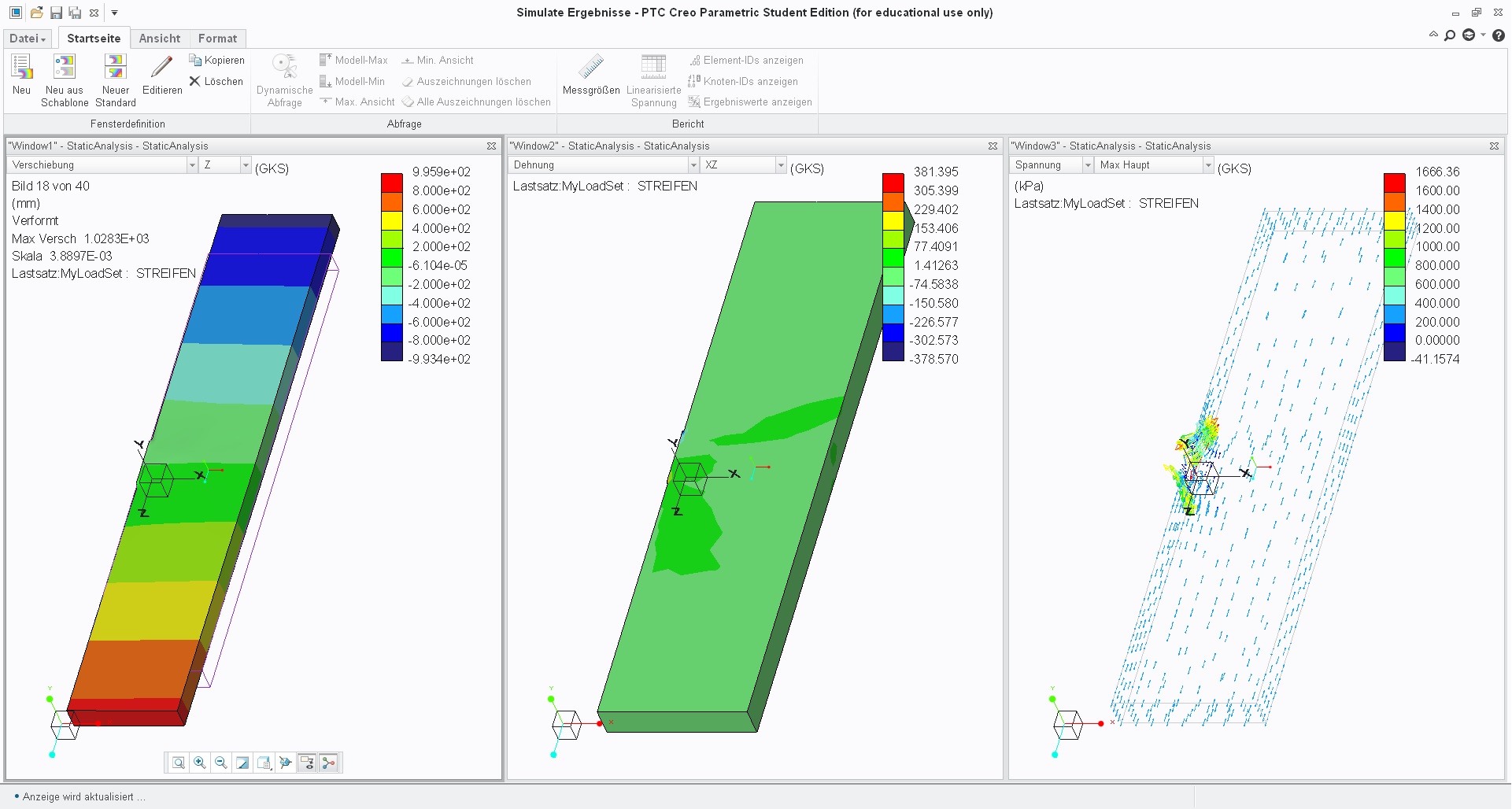
I just simulated the displacement in Creo and the results don't fit together. So here is the data:

Part geometry: 40mm x 10mm x 2mm

F=5N on every longitudinal side

E=5 kPa
displ.strain.jpg

How can I have a strain(Dehnung; in the middle) of around 20% and a displacement(Verschiebung;left site) of around 1 metre?

I hope someone can explain,

Best, Kathrin


This thread is inactive and closed by the PTC Community Management Team. If you would like to provide a reply and re-open this thread, please notify the moderator and reference the thread. You may also use "Start a topic" button to ask a new question. Please be sure to include what version of the PTC product you are using so another community member knowledgeable about your version may be able to assist.
Best answer by 346gnu

that looks like 'simulate lite'

your options are very very limited starting with maximum of 200 surfaces and absolutely no good for non-linear of any kind.

you would probably need the advanced license.

3 replies

13-Aquamarine
May 16, 2016

Are you sure that you don't have a strain of ~20 (2000%)?

As usual, check that your material Young's Modulus isn't off by a factor of 1000 - for some reason it seems too easy to end up with (say) 206 MPa instead of 206 GPa...

knispel1-VisitorAuthor
1-Visitor
May 16, 2016

I'm positive that I have a strain of 0.2, so 20%. I doublechecked that with the dynamic analysis. 😕

13-Aquamarine
May 16, 2016

I agree, units seem a reasonable candidate.

20% strain = 0.2, you're getting 1000 times this

Check you E value. 5kPa might be right but to me it seems exceptionally small.

Plastics such as polycarbonates are in the order of 3GPa

knispel1-VisitorAuthor
1-Visitor
May 16, 2016

I see your point but as said, Im positive that is right.

The small Young's Modulus is because I am simulating tissue, which is actually hyperelastic. Is it a possibility that the mistake comes from doing a linear simulation with a hyperelastic material? I somehow didnt find the properties for a hyperelatic simulation.

13-Aquamarine
May 16, 2016

My we look at the model?

Can you upload it?

2-Explorer
May 17, 2016

Kathrin,

How is your model constrained? Did you use 'inertial relief' for your analysis? If so, this could easily be the culprit.

-Shaun

knispel1-VisitorAuthor
1-Visitor
May 25, 2016

Sorry for the late response.

I didn't really use it on purpose but since I am simulating a biaxial tension test the body is nowhere really fixed in space. I just selected 'Simulate' in the taskbar and then it asks me for material, constraints, loads, you have to click analyse then and it gives you the results. There is no more options like 'analysis definition form'...

Just showing you what options I have:simulate.png

346gnu13-AquamarineAnswer
13-Aquamarine
May 25, 2016

that looks like 'simulate lite'

your options are very very limited starting with maximum of 200 surfaces and absolutely no good for non-linear of any kind.

you would probably need the advanced license.