1-Visitor
October 14, 2015
Question

Creo Simulate vs ANSYS Workbench contact analysis w. friction.

  • October 14, 2015
  • 3 replies
  • 19415 views

Hello all simulation geeks...

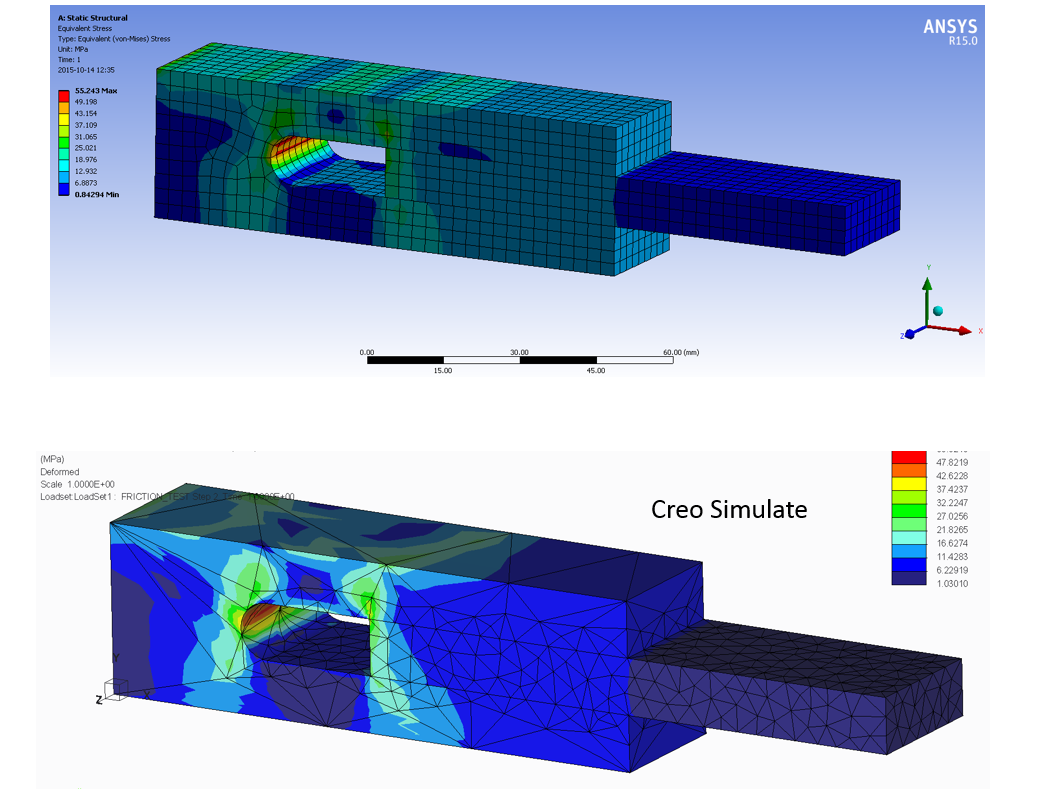
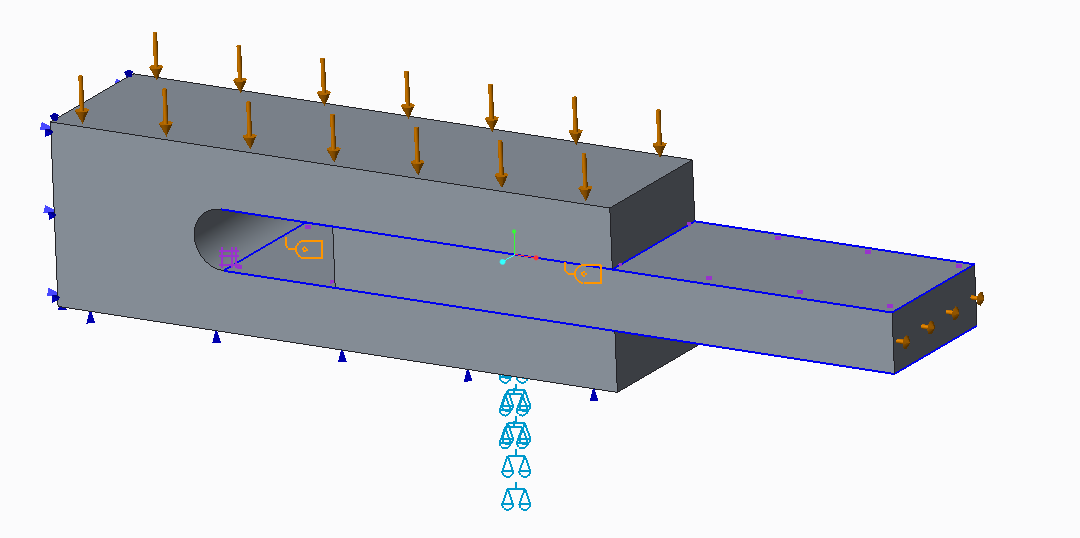
Just for fun, I made a comparison between ANSYS and Creo Simulate 3, to see what the new frictional contact can do in Creo 3. A block with a slot, a plate is located in the slot. The block is squeezed with 20 kN, the plate is pulled out with a force of 1 kN. Coefficient of friction is 0.2, static and dynamic.

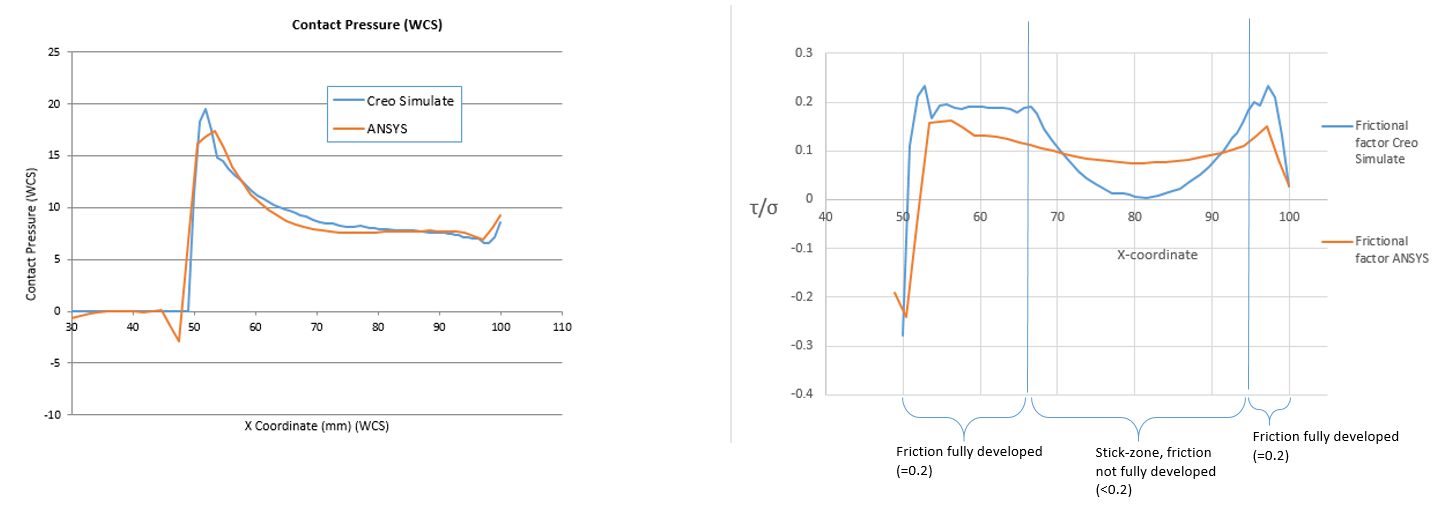
Two graphs showing the contact pressure, and frictional factor, i.e. shear stress at the surface/contact pressure. This should be =0.2 where the friction is fully developed, and <0.2 in the stick zone where friction is not fully developed. Similar results, no particular effort was made to refine the solution, except a slight mesh refinement compared to default mesh...

B.R. Mats L (*for the moment out of assignment*)
Capture0.PNG

Capture.PNG

Capture1.PNG

3 replies

14-Alexandrite
October 14, 2015

Nice comparison Mats!

Are you saying that Creo Simulate is better, since the frictional factor in the fully developed zones is closer to 2.0 with Creo than it is with Ansys?

Best Regards,

Jari Elomaa

1-Visitor
October 14, 2015

No, if I refine mesh and/or convergence criteria for ANSYS, then I would think it will produce more accurate results aswell. In addition, ANSYS has several different contact formulations. I used "frictional contact" in combination with "Augmented Lagrange" solving technique; I dont know ANSYS well enough to tell which contact algorithm is the most suitable in a given situation. I guess it's a trade-off between time/cost and accuracy, as is often the case. Some contact formulations in ANSYS are computationally effective, but not so accurate on a detailed level.

14-Alexandrite
October 14, 2015

Oh ok. So the main point is that with default settings you may get better results with Creo 3. This is very good to know.

I haven't done any simulations with Creo 3... yet, but I have worked with Ansys for a couple of years and I agree that it tends to require a bit of experimenting with solver settings from time to time. We are only starting to introduce Creo simulations in our R&D and the aim is to get more and more engineers to do some simple simulations and maybe even more complex ones when they get to know the software. Your comparison shows that there are some good and easy capabilities in Creo Simulate, which may prove to be very useful for us.

Thanks again.

15-Moonstone
October 14, 2015

Bonjour Mats,

Merci pour cette comparaison entre ces deux logiciels.

Avec quel logiciel avez-vous fais les deux graphiques.

Auriez vous la possibilité de mettre le fichier Creo à disposition pour faire des manipulations et apprendre comme model.

Cordialement.

Denis.

Hello Mats,

Thanks for this comparison between these two software.

With what software have you do the two graphs.

Would you have the possibility of putting the Creo file available for manipulation and learn as model.

Kind regards.

Denis.

1-Visitor
October 14, 2015

Salut Denis,

Les logiciels sont ANSYS Workbench v15, and Creo Simulate 3.0. Les fichiers Creo sont joints ci-dessous...


/M

15-Moonstone
October 14, 2015

Bonjour Mats,

Merci pour la réponse.

Re: Avec quel logiciel avez-vous fais les deux graphiques.

Cordialement.

Denis.

12-Amethyst
October 15, 2015

Hi

nice and interesting initiative. Thanks for sharing.

I am wondering why having selected a mesh so different between Ansys and Creo.

1-Visitor
October 15, 2015

Creo uses "P-method" which raises the degree of the polynomials that describe the displacement field. ANSYS uses the H-method where the polynomial degree is fixed,for  all elements, and is normally 2, i.e. quadratic elements. This means that with the H-method and quadratic elements, stresses and strains can only vary linearly within an element.  In creo, the P-level can be raised to 9 and this is done adaptively; in areas with higher stress gradient, the P-level is raised so that a more complex displacement field can be described with a single element. This allows a much coarser mesh than is required if the P-level is fixed to 2, as is the case for Ansys. So the meshing algorithm in Creo is adapted for the P-method, while the meshing functionality in ANSYS is adapted for the H-method. I guess the P-method makes it more difficult to implement nonlinear functionality, which is undoubtedly much better in ANSYS than in Creo Simulate. I think ANSYS has the P-method, but the mesher is not adapted for it, and the P-level is limited to 5 if I remember correctly. And I'm not sure of what nonlinear functionality is supported with the P-method in ANSYS. My guess is that very few Ansys users utilize the P-functionality in Ansys. Long story short: you can't compare Creo Simulate Mesh with ANSYS mesh.

13-Aquamarine
October 15, 2015

Nice.

My lunchtime meanderings in Ansys following on from my earlier frustration where I could not get it to work in Creo

Re: Finite friction blocks

Below took 2 mins to build and run 20mins to make pics and post.