
1-Visitor
May 25, 2012
Solved

Desired angle datum creation???

  • May 25, 2012
  • 5 replies
  • 5867 views

Hi Guys,

I am facing a problem while creating Datum plane(WF4) at desired angle to default plane i.e.

when I create the plane w.r.t default mid plane by default it takes angle refered from 12 o' clock position & with clockwise angle but I want it to be created in different positions for example I want it to be referenced from 6 o' clock position with counterclockwise rotation as well, please help me.
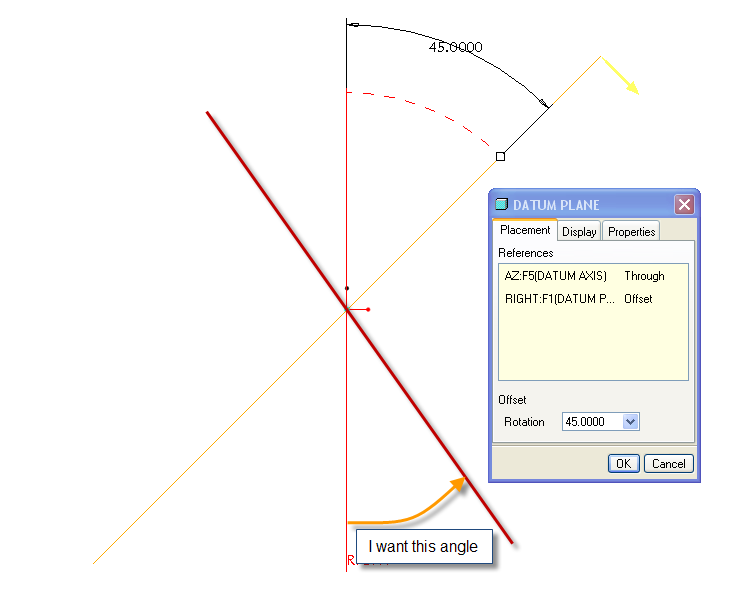
Datum.png

Best Regards,

Harish


This thread is inactive and closed by the PTC Community Management Team. If you would like to provide a reply and re-open this thread, please notify the moderator and reference the thread. You may also use "Start a topic" button to ask a new question. Please be sure to include what version of the PTC product you are using so another community member knowledgeable about your version may be able to assist.
Best answer by JonathanHodgson

If you enter a negative angle (-45°) the direction of measurement will flip, and the finished plane will show a positive value.

5 replies

1-Visitor
May 25, 2012

Hi, Harish.

You can change the value of the rotation angle from 45 to 135 degree.

You can also drag a handle to rotate a datum plane dynamically. This handle appears as a white dot when you select a datum plane.

Then you'll just need to correct the value of the angle.

Best regards, Vladimir.

777.jpg

13-Aquamarine
May 25, 2012

If you enter a negative angle (-45°) the direction of measurement will flip, and the finished plane will show a positive value.

hmr1-VisitorAuthor
1-Visitor
May 25, 2012

Thanks for your suggestions but I want the same angle(if it is 45° I want 45° not 135° in the other way as well) because I wanna show that angle in the drawing so -45° or 135° does not work for me.

13-Aquamarine
May 25, 2012

Hi Harish...

I don't have Wildfire 4 or 5 up right now and it would take me awhile to fire them up at the moment... so I'm going off the top of my head (just warning you).

Try flipping the red/yellow side of your plane. You might be able to flip the NEW plane and have the angle flip to the other side as you wish. If that doesn't work, you may want to create a new base plane (your vertical plane) to dimension from. You can edit the definition of your vertical plane and switch the red/yellow sides but this will probably cause problems with other features. In that case, it's safer to make a new plane and toggle the red/yellow side of that plane.

If this doesn't work, you're probably getting into the area where you'll have to create a helper datum to get you the right dimension... maybe a point at the right angle... or a datum curve to drive the angle? Hmm... it's very late/early here and I feel like I'm missing obvious solutions. Write back with your results... I'm sure I'll be more clear headed in the morning!

Thanks!

-Brian

hmr1-VisitorAuthor
1-Visitor
May 25, 2012

Thanks guys I got what I need

13-Aquamarine
May 25, 2012

Seriously... ONE minute before I posted that long email... you solved it! Story of my life!

13-Aquamarine
May 25, 2012

Brian - seriously, what time are you posting?!? I've just got into work, but isn't it the middle of the night in the States?

hmr1-VisitorAuthor
1-Visitor
May 25, 2012

@Brian

Thanks bro, helping me in the early morning superb

@ Jonathan

Your tip did work for me thanks a lot

@ Vladimir,

Thanks to you as well for trying to help me