4-Participant
June 28, 2025
Solved

How To Model A Screw Locking Patch Feature

  • June 28, 2025
  • 3 replies
  • 1756 views

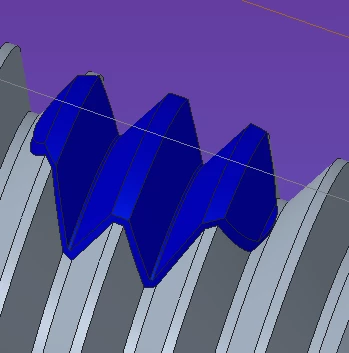
Would anyone know how to model a locking patch screw feature like the one you can find in the STEP files that are available from McMaster Carr with the threads modeled? As the picture shows, there is a very small protrusion coming off the screw threads to represent the locking patch.


I can easily create a datum curve and project it onto the threads, which for all practical purposes is sufficient. But I am quite annoyed that I cannot figure out how to actually make it as a protrusion. If McMaster Carr can figure it out, it seems like I should be able to.


I find the visible locking feature quite handy to make sure the locking patch is actually engaged with the mating threads. Eternal thanks if anyone has any suggestions.

Best answer by kdirth

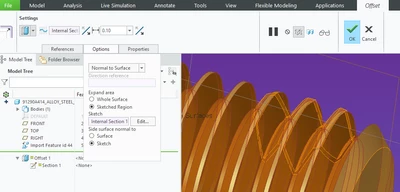
I would suggest using Offset>Expand>Sketched Area.

kdirth_0-1751281665875.png

kdirth_1-1751281794285.png


3 replies

21-Topaz II
June 28, 2025

You can model the threads using a helical sweep.

One possible way I would model this is to build the model as a solid non patched screw, then cut a very thin-walled oval where you think the patch is, to a sufficient depth to look like what you want. You could even modify the surfaces of the patch region making them white or something that approximates the look of nylon.

I don't know where you will get specifics about where the patch is actually located on these types of screws. Maybe there are some sort of standards about it.

Modeling fully threaded screws can cause a lot of headaches if you are using a lot of them in assemblies. They cause a slowdown in hidden line rendering. I've suffered the effects of someone putting hundreds of them in an assembly and it becomes a nightmare to deal with.

4-Participant
June 28, 2025

If anyone is curious, a very detailed standard exists for inch screws that actually defines the dimensions of the patch which is MIL-DTL-18240. No metric equivalent, and we are using metric screws  which is how life works 😉 ND industries has a downloadable PDF which states 1.5 to 2 threads left free, a minimum of at least four thread pitches locking area, and 90° of patch coverage. Long Lok fasteners also give similar dimensions in their handbook catalog for standard patches.


I know how to create the helical sweep to cut in the threads on a solid part, but I do not see how you could create a thin walled oval cut. What would the oval be extruding to since the depth constantly changes as it is moving along the sweep?


You would think by 2025 graphics cards and processors should be able to handle threads 😁 I have been hearing for over 30 years how 2D PDF drawings will be going away!

21-Topaz II
June 28, 2025

You're not sweeping anything to cut the "patch". A protrusion with a thin wall (0.002 inch or so should work) is cut so you are basically making a "moat" around where the patch is. You might start the protrusion from the center axis of the bolt.

Graphics cards are powerful and able to do shaded stuff remarkably fast, but to the best of my knowledge hidden lines still need to be calculated algorithmically, thus adding a large number of edges that need to be evaluated makes things slow.

kdirth
21-Topaz I
kdirth21-Topaz IAnswer
21-Topaz I
June 30, 2025

I would suggest using Offset>Expand>Sketched Area.

kdirth_0-1751281665875.png

kdirth_1-1751281794285.png


There is always more to learn.
4-Participant
June 30, 2025

Wow!!! That is awesome!! Exactly what I was looking. I bow down to your Creo knowledge in deep, arcane menu choices 😁


I tried it out, and it worked exactly as you have pictured. I would never have figured that out on my own. Thanks!

12-Amethyst
June 30, 2025

If you only want a visual feature to ensure that the mating bolt is interfering with the locking feature, you could sketch a rectangle on the center plane and add a plane at the top and bottom of the feature, parallel to the bolt head. Those feature won't make the part much "heavier" and you can show them when needed for the visual inspection. You can then use those features in family tables to change the locations for different sizes and lengths.