
1-Visitor
September 21, 2015
Question

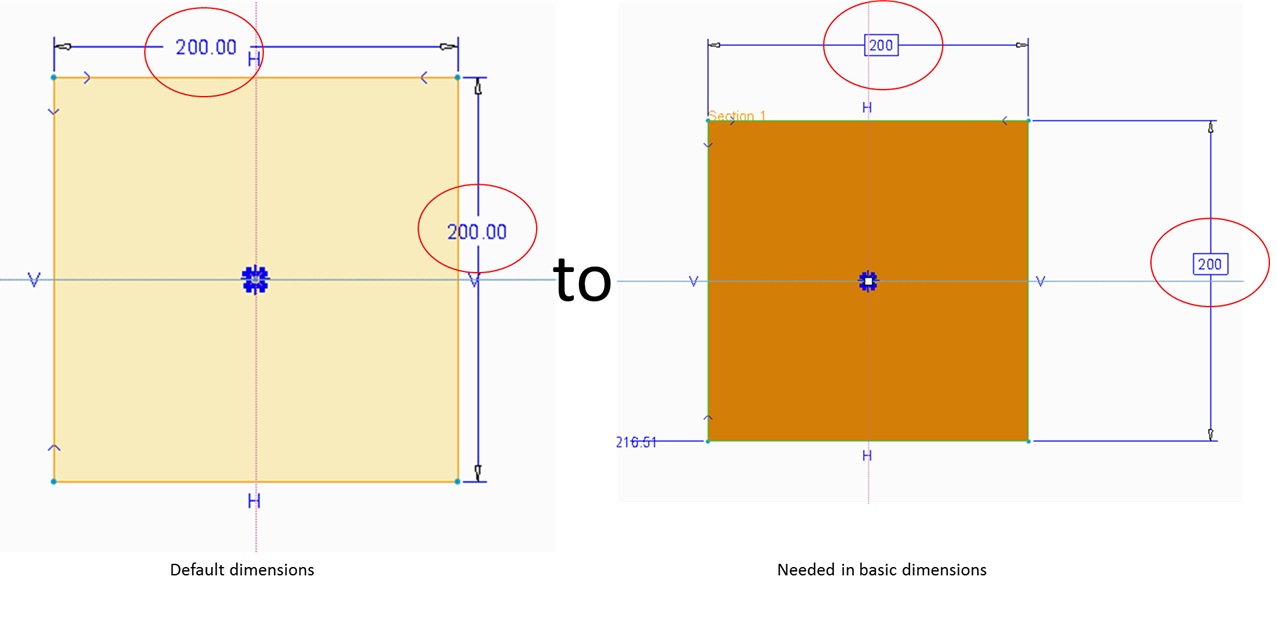
How to set default normal dimension to default basic dimensions in sketcher
  • September 21, 2015
  • 1 reply
  • 1596 views

How to set default normal dimension to default basic dimensions in sketcher.jpg


This thread is inactive and closed by the PTC Community Management Team. If you would like to provide a reply and re-open this thread, please notify the moderator and reference the thread. You may also use "Start a topic" button to ask a new question. Please be sure to include what version of the PTC product you are using so another community member knowledgeable about your version may be able to assist.

1 reply

23-Emerald III
September 23, 2015

This is not possible with current functionality. You have to complete your sketch and then edit the properties on your dimensions to make the basic.

basicdim.jpg

sdara1-VisitorAuthor
1-Visitor
September 23, 2015

Thanks for the replay

Yeah, Right now I am following same process

Actually I have do for each dimensions (for every drawing we need to change more than
100
dimensions), so I working on for better process and time effective.

24-Ruby III
September 23, 2015

Hi,

use Find button to select all dimensions. Then go to properties dialog and set Basic options for all of them in one step.

select_all_dims.png

MH