
21-Topaz II
December 23, 2016
Question

Metric Thread Note, English Part

  • December 23, 2016
  • 4 replies
  • 5858 views

Creo 2, M230

I've got an English part that has metric external threads.  I've created the thread in the part as metric (M18 x 2.5), but when I show the thread note, it maddeningly shows it in inches:
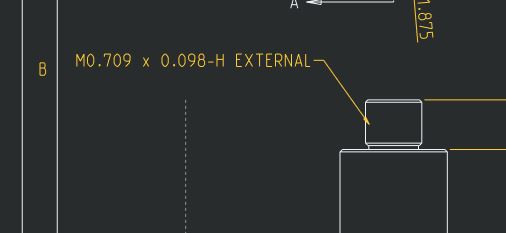
Capture.JPG

Who wants this and more importantly, how do I fix it?

4 replies

17-Peridot
December 23, 2016

Oh Doug...  Funny how that works huh.

Are your thread notes custom?  Somehow Creo is suppose to convert that which is on the tables to some acceptable form for a note.  This seems to happened in background because I have not found one thing that shows the variables used in the thread notes.

I, for one, have no patience nor time for these "good efforts" by PTC.  I have work to get done and these little things just slow people down.

If indeed this level of associativity is a requirement for the organization, then these questions should have become obvious when the organization defined the process of using Creo (standards and policies).  If that is the case, then this should also be thrown back over the wall to determine the "'right" way everyone should be dealing with this condition.  I come from an organization where 50% of drafting time was wasted on nonsense rules.  It didn't make better drawings and it didn't get the support it needed.  It just wasted time for 6-someodd drafters and a handful of engineers.  PTC could go a long way to make some intelligent editors for these many tables that Creo relies on.  Some level of update support would also be very welcome.

21-Topaz II
December 23, 2016

I doubt there are custom notes, but it's possible.

Interestingly, the notes for the threaded holes display properly, well, at least in metric.  It's only this cosmetic thread applied to represent the external threads.  Also, the hole notes end up on my notes layer, this one didn't.  It's special in some way, I guess.

I'm trying to use the built in tools for threads in Creo, but I'm moving back to ignoring them and just adding a dumb note on the drawing (which s my default work around here).

17-Peridot
December 23, 2016

It is only special as in the fact that it was relegated to legacy status.

Cosmetic threads are out of sync with threaded holes capabilities.

Personally, I think that ignoring cosmetic threads was a clumsy mistake in the new thread definition efforts.

We should have class A and class B threads that can be applied in exactly the same way.

And who knows, maybe they did something about it with a different method, but not something obvious that I can find.

1-Visitor
December 23, 2016

This is why dimensions should have individual units.

1-Visitor
December 24, 2016

‌From what I've seen the values used in the note seem to just be parameters that don't control the cosmetic geometry. The cosmetic appears to pull the BASIC_DIAM, THREAD, and TAP_DR OR TAP_DEC dimension values from the hole tables but they don't appear to be tied to it. I'm able to change the major diameter, minor diameter, and pitch values to metric on the properties tab, the dimension that controls the cosmetic geometry doesn't appear there. You can create .thr file that has the thread parameters for reuse in other parts. A note feature isn't created for a cosmetic like it is for a hole.

17-Peridot
December 25, 2016

True, this is why I called it Legacy.  It made a lot more sense in the past.  Was it WF or Creo that created the new variables internally?

1-Visitor
December 25, 2016

‌Not sure about that. I started on 2000i and 2001 but only used these versions for about 3 months until we moved to WF2. I didn't use cosmetic threads till WF3 or WF5 but I only use them for display purposes I don't use the note I usually create that manually. I want to say it changed with Creo as I seem to remember the thread cosmetic changed when the major and minor diameter values in the .thr file were changed at some point and that you couldn't specify a thread standard from a hole file but I used cosmetic threads so infrequently that I can't say for sure.

1-Visitor
January 24, 2017

To be honest, I have found Creo's thread notes are pretty terrible for the most part. I always add them in manually as a leader note. Otherwise, I would recommend updating the part to be in metric.