1-Visitor
February 23, 2026
Solved

Questions with making rounded edges

  • February 23, 2026
  • 4 replies
  • 159 views

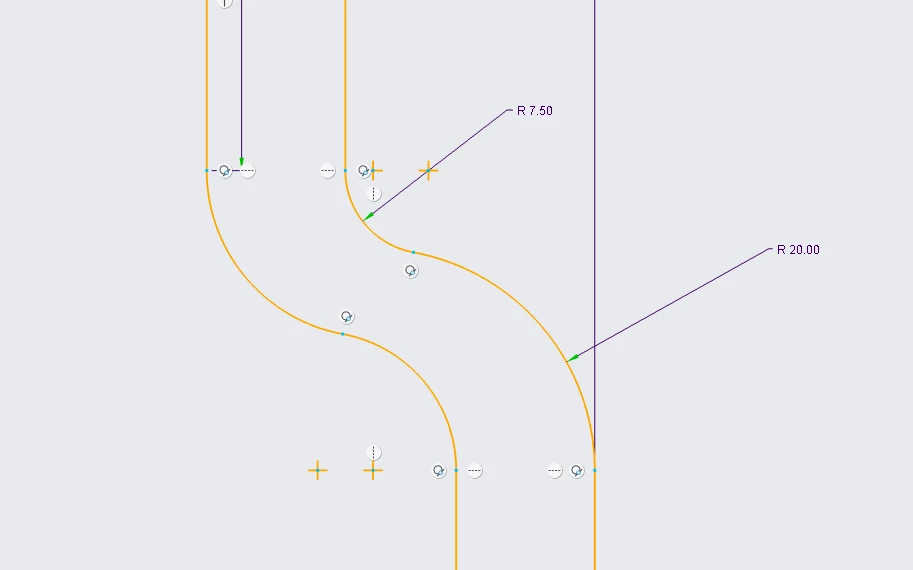
Hi everyone, I'm doing this creo excercise and amquite confused seeing how the tutorial video handled this part of the drawing.Screenshot 2026-02-23 090853.pngScreenshot 2026-02-23 091035.png

tia!

link to the video I'm referencing: https://www.youtube.com/watch?v=ssI7dJEkdys

Best answer by aputman
I haven't watched the video but just looking at your sketch, this vertical constraint is causing some of your issues.  You have to be careful when the auto-constraint option is enabled.  You'll end up with constraints that are not intended and can be difficult to find.
 
If you intend to maintain constant material thickness thru this section, the radii must be concentric.  I much prefer to keep the radii as separate features, in most cases, rather than extruding or revolving them due to the amount of complexity they add to sketches. 
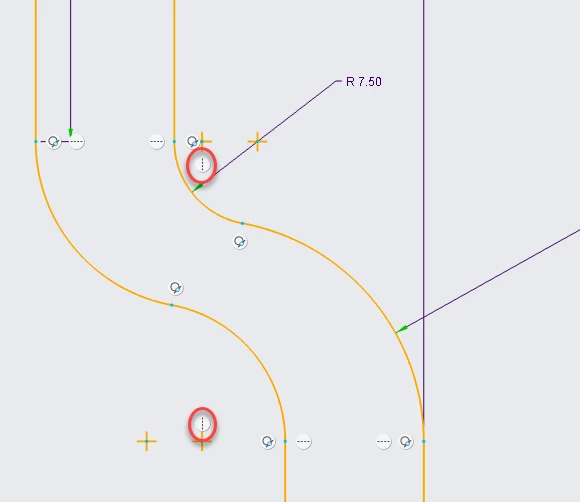
image.png

4 replies

Dale_Rosema
23-Emerald III
23-Emerald III
February 23, 2026

It's a 37 minute video.

About where is the video are you when you have questions?

Also, what are you trying to achieve?

aputman13-AquamarineAnswer
13-Aquamarine
February 23, 2026
I haven't watched the video but just looking at your sketch, this vertical constraint is causing some of your issues.  You have to be careful when the auto-constraint option is enabled.  You'll end up with constraints that are not intended and can be difficult to find.
 
If you intend to maintain constant material thickness thru this section, the radii must be concentric.  I much prefer to keep the radii as separate features, in most cases, rather than extruding or revolving them due to the amount of complexity they add to sketches. 

image.png

1-Visitor
February 23, 2026

Understood, thank you for your help!

23-Emerald III
February 23, 2026

Another additional item that may apply...or may not based on the part drawing dimensions

Sometimes there is a straight that is between the radii that is really short. In other words, the 2 radii on one side wouldn't touch, there would be a tangent line between them.  It's 100% based on the dimension given so it may or may not be needed.

In the big big of that part, it's probably supposed to be sheet metal and have a constant thickness 

13-Aquamarine
February 23, 2026

To support what Stephen says, it appears there are two dimensions (plus a thickness dimension off the top of the image) that are driving the length and angle of this step.  It's very difficult to interpret with such a small image.  These dimensions seemingly point to the intersection of the two surfaces, as if the radii were not there.  You can see what that might look like in my example below with the red arrows.  The purple arrow points to the small angled surface, that Stephen mentions, that may or may not be there, depending on the values. 

image.png

image.png

22-Sapphire II
February 23, 2026

I am not sure what your objective is with using the tutorial, but I would not consider it a best-in-class example of how to leverage Creo Parametric for geometry creation. I am not claiming it is wrong per se, but I see opportunities to create the geometry in a manner that is faster and more robust when flexed (i.e. change dimensions or geometry edits).

IMO the tutorial is not teaching best practices for sketcher or modeling techniques. As others have pointed out using the round features on the geometry rather than including fillets in sketcher is better in many cases. In general, make the sketches as simple as you can and minimize the # of entities in a sketch.

For the geometry in question of the OP. You would be better served by creating a revolved solid using the thin option, so you are only sketching the outside dimensions of the axisymmetric (cylinders) needed to create the geometry and Creo will manage the wall thickness internal to the feature with a simpler sketch. You will roughly cut in half the sketch entities and constraints by using this method. You can observe the reduced complexity of the sketch in the image below.

Simplified sketch thin revolveSimplified sketch thin revolveAdd radii to corners of tube geometryAdd radii to corners of tube geometry