
3-Newcomer
December 12, 2024
Solved

Shelling Failure of a Surface-Modeled Part

  • December 12, 2024
  • 3 replies
  • 1039 views
I've made a part through surface modelling in Creo 10 that now needs to be solidified and shelled. The part has family instances of different sizes. The part solidifies succesfully (which also works in each instance), but I can't get it to shell.
 
I've tried using the 'Shell' feature, but also by manually offsetting the surface quilt. The ' Shell feature' results in the error message "Highlighted surfaces are too curved to offset by specified value. Recommended actions: Make a quilt from good surfaces, offset the quilt, make patches over missing surfaces."
 
Offsetting 'unproblematic' surfaces works (with difficulty) in the master model, but at least one of the family instances always fails, depending on the surfaces I exclude from the offset. If I remove the surface(s) that causes one failure, I will have an error in a different surface the next time around.
 
Any advice or ideas for solving this? I would like to avoid remodelling the entire inner surface, for ease of future changes. I can't attach the file for IP reasons. 
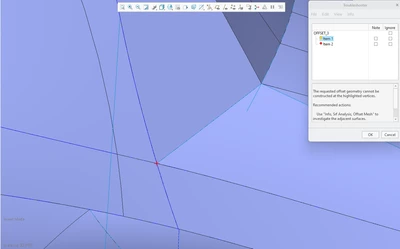
 
FG_9348911_0-1734012852211.png


Best answer by kdirth

Offsetting complex surfaces tends to be problematic.


The best advice I can give is to do your best to keep the surfaces smooth, simple and avoid small pieces.


Looking at the image, you have a lot of small surface sections that will cause issues when offsetting the surfaces.  From my experience, anytime a surface or a vertex of a surface would be eliminated in the offset it will fail.

3 replies

kdirth
21-Topaz I
kdirth21-Topaz IAnswer
21-Topaz I
December 12, 2024

Offsetting complex surfaces tends to be problematic.


The best advice I can give is to do your best to keep the surfaces smooth, simple and avoid small pieces.


Looking at the image, you have a lot of small surface sections that will cause issues when offsetting the surfaces.  From my experience, anytime a surface or a vertex of a surface would be eliminated in the offset it will fail.

There is always more to learn.
tbraxton
22-Sapphire II
22-Sapphire II
December 12, 2024

When creating models to be shelled it is advisable to define the max offset value before modeling and checking every few features to confirm that they can be offset to the target thickness as a minimum requirement. I would test at 1.2x the desired value, when possible, to ensure a more robust geometry in the model. Use the offset surface analysis mesh to test this as you build the master model.


One common cause of this issue are surfaces that are of a radius (at one or more points on the surface) that is too small to be offset by the requested amount using the standard offset algorithm. If you have a 1 mm fillet radius in a corner, you can visualize that if you offset this by more than 1 mm then the geometry will fail as the offset radius would be less than 0.


Another common failure is that a vertex where multiple surfaces meet at a point is not possible with the offset surfaces and the offset is not a closed quilt. You will see this type of problem when using the offset analysis tool as well it will usually reveal the discontinuity of the offset geometry.

3-Newcomer
January 14, 2025

All great advice, thanks! Indeed, there was no simple solution, just remodelling it so that the quilt was simplified, offsetting the quilt manually (excluding all surfaces that would fail in any instance), and then rebuilding the offset quilt manually. Maximizing the number of surfaces that could succesfully offset was achieved by reducing the number of boundary blends (first making sketches and then connecting as many as possible with a single boundary blend), using composite curves, and ensuring strong references. Not an easy nor quick process, and often failures in singular instances felt nonsensical.
