
19-Tanzanite
January 8, 2023
Question

Too small of a value for absolute accuracy causes model regeneration failure ???

  • January 8, 2023
  • 3 replies
  • 4329 views

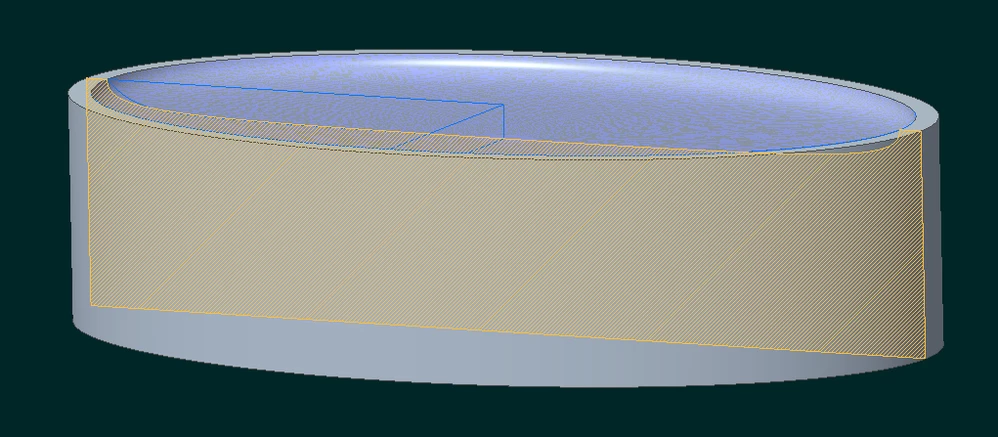
While crafting this "toy" CAD model to answer another question on this forum, I re-discovered the curious issue that one sometimes encounters with models which "goes away" if you play with the model accuracy.
pausob_0-1673142787134.png

The dimpled top surface is generated by (graph-driven) variable section sweep.

The model works fine if the absolute accuracy is 0.001 (or greater?) - but fails when it is smaller...

The model in the attached zip file is failing as it was saved with absolute accuracy value set at 0.0001.


Isn't it concerning that increasing the fidelity of the model breaks it?

This model made in Creo 4; I'd be curious to hear whether such problems are not encountered in newer version of the software.

3 replies

tbraxton
22-Sapphire II
22-Sapphire II
January 8, 2023

Using the graph to drive the sweep in this manner is not something I would have even tried as I expect it would not work. IME the sketcher does not usually work when forcing curves to adopt a zero length. IDK why it works at all at any accuracy setting but I suspect that a coarse enough abs accuracy somehow avoids the zero length curves. I would be pleasantly surprised if PTC came back and said this is a valid approach to driving a sketch as it is quite useful.


In Creo 7.09.0 it will regenerate down to 0.0007 mm absolute accuracy. Below this value the regeneration fails, and command line reports the following error which is likely the evalgraph function.


Line 1 Section of model TOO_MUCH_ACCURACY_FAILS::Probable error in function evaluation.


I suspect it is related to the fact that your sketch requires that within the VSS sketch that SD3 and SD 6 =0 at the full depth of the cut out. 


I would definitely be interested to hear what PTC R&D has to say about this.

pausob19-TanzaniteAuthor
19-Tanzanite
January 8, 2023

Hi @tbraxton, having VSS sections that have segments / elements that are/become 0 length as the trajpar parameter  evolves has been something that always worked, IME.

Anyway, I don't think that's the issue here because if I modify the graph so that the 0 size ellipse does not happen:

pausob_1-1673201448296.png

-->

pausob_0-1673201285270.png

--> the model still fails for when the accuracy value becomes too low, with the same error message.


It seems the problem is more related to the 90 degree angle at the end of the graph curve.  For example, with this graph:

pausob_3-1673201737504.png

-->

pausob_5-1673201787102.png

The model works all the way to the minimum accuracy value of 4e-4...

So I think the bug is more in the graph evaluation code.  Maybe it thinks that the graph is "non-functional" (i.e. 2 y-values for the same x-value) at the end?

But I'd think that should be resolved with the better (lower value) accuracy setting...


Last test that supports my hunch: by setting the angle at the end of the graph to 89°, these artefacts appear:

pausob_7-1673202419236.png


Maybe someone from PTC can take the content of this thread to R&D and they can file their own bug report and prioritize its resolution accordingly.

tbraxton
22-Sapphire II
22-Sapphire II
January 8, 2023

I concur with your observations about the root cause not being the sketch going to zero. I am pleased that is not the case as using trajpar to drive a sketch dimension to zero is useful. I have never attempted it or seen it done that I recall. I have used graph driven features many times but not with that paradigm.


I have seen in the past (Creo 4) an issue with correctly evaluating a curve from equation at some accuracies (relative). I opened an SPR and PTC stated that it would be fixed in Creo 7 because the default accuracy is absolute. They did not fix the issue per se but since the function was accurate using absolute accuracy, they considered it fixed. It is a possibility that this could be related to that issue. The curve in question was accurate when using absolute accuracy but I did not sweep through different values of absolute accuracy.


You should open a support case for this one.

Patriot_1776
22-Sapphire II
January 9, 2023

You can drive values TO zero using trajpar, but not FROM zero to a value.  So, you have to work your model around that.  I've done that many times including using graph features to drive trajpar to zero.


Absolute accuracy is just that, absolute.  Sadly, Pi is NOT absolute.  So, when there is a larger absolute accuracy value (.001 vs .0001), Creo adds in a little mode "fudge factor" to make it regenerate.  I've had many times where all the complicated features EXCEPT the last one regenerate just fine.  So, I make the value for absolute accuracy smaller (.00005 vs .0001) and then THAT feature regenerates, but others fail.  Sometimes, it's trial and error until you find some weird accuracy number in between that allows them all to regenerate.  And even then, sometimes you can't, and have to change something slightly to make all the features regen.  Sometimes, there is no easy answer and sometimes the numbers you try and use for a feature simply won't regen, then it's time to change the design slightly.


Best of luck!

tbraxton
22-Sapphire II
22-Sapphire II
February 12, 2023

I got a very limited response from R&D. I have followed up with questions based on the response below. If anyone has questions related to this response, let me know and I will try to get an answer.


The user applied accuracy to less than a micron meters(half micron) for a part of size 482 mm, more precisely with relevant dimensions approximately 200 X 100.This looks beyond the range for which Creo was tuned to work efficiently.

More important this is a sweep in which sections degenerate – the ellipse at “the bottom” (trajectory end) becomes a point.

The sweep is done by creating (regenerating) sections along the trajectory and “connecting the dots” (sections in this case) – creating a surface through the sections.

I assume that in this case, because of the tight accuracy we are forced to construct sections very close to the end/singular section, and that the dimensions (ellipse semi-axes lengths) in the sections themselves (other than the end section) get below the tolerance the sketcher allows.


90->89 degrees change in the graph attempt that change, in turn, somehow changes the rate of change of the dimensions near the zero value (at 1.0 trajectory parameter). and so works

pausob19-TanzaniteAuthor
19-Tanzanite
February 12, 2023

Thanks for inquiring about this with R&D @tbraxton 

To me the answer from PTC R&D seems unsatisfactory - seems like a bunch of handwaving about user pushing the limits of the software beyond its capabilities. And if that is indeed the case, then I ask them whether the UI should prevent the user from making such "mistakes"?

pausob_0-1676188637366.png

I mean, I get the whole accuracy thing is a big mystery as I can set the precision of a dimension to 10 decimal places...


More important is they didn't seem read the content of the entire thread closely as it is pointed out that ellipse section degenerating to a point is NOT the cause of the "too high of an accuracy" related regeneration failure.  So my question - doesn't the evidence presented (and the error message itself - "probable error in function evaluation")  point out the problem is in the evalgraph function?


15-Moonstone
February 13, 2023

Hi,
from back at my days at PTC I seem to remember that 'decimal places is unequal to accuracy'.
Accuracy determines the 3D geometry calculation. Simply put: 'how close do two points have to be to be regarded as mathematically coincident'.
This is also why you get different results when you import geometry like Step into templates parts with different accuracies.
The decimal places determine the actual size of something. So a length of an item can have 5 decimal places at an accuracy of 0.01.